Pooyan Razian

AWS Cost Optimization Hub

AWS Cost Optimization Hub
Published: November 25, 2023

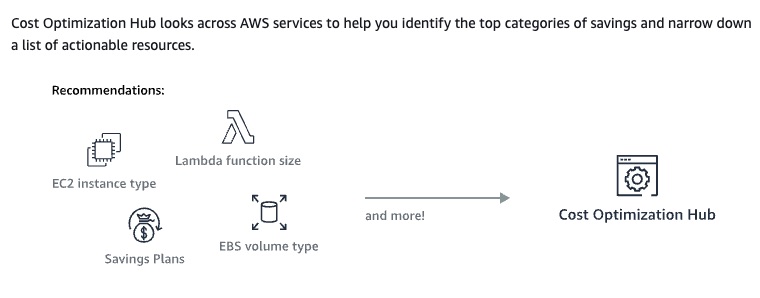
Today, AWS announced the AWS Cost Optimization Hub. A new feature in AWS Billing and Cost Management that makes it easy for you to identify, filter, aggregate, and quantify savings for AWS cost optimization recommendations across multiple AWS Regions and AWS accounts in your organizations without any data aggregation and processing. It provides a single dashboard where you can interactively query cost-related recommendations such as resource rightsizing, idle resource detection, and purchasing options. You can find out how much you’ll save if you implement those recommendations and easily compare and prioritize based on savings.

Policy to opt into Cost Optimization Hub

The following policy statement grants you access to opt into Cost Optimization Hub by giving you access to create the required service-linked role for opting in. It also grants access to the Cost Optimization Hub feature to update the enrollment status.

{ "Version": "2012-10-17", "Statement": { "Effect": "Allow", "Action": "iam:CreateServiceLinkedRole", "Resource": "arn:aws:iam::*/aws-service-role/cost-optimization-hub.bcm.amazonaws.com/AWSServiceRoleForCostOptimizationHub", "Condition": {"StringLike": {"iam:AWSServiceName": "cost-optimization-hub.bcm.amazonaws.com"}} }, { "Effect": "Allow", "Action": "iam:PutRolePolicy", "Resource": "arn:aws:iam::*/aws-service-role/cost-optimization-hub.bcm.amazonaws.com/AWSServiceRoleForCostOptimizationHub" }, { "Effect": "Allow", "Action": "cost-optimization-hub:UpdateEnrollmentStatus", "Resource": "*" } }

Also, currently, two AWS-managed policies exist that can help you get started with Cost Optimization Hub actions. One policy provides you with read-only access to Cost Optimization Hub, and the other policy provides you with admin access.

For more information, check out this link.

Let's enable it

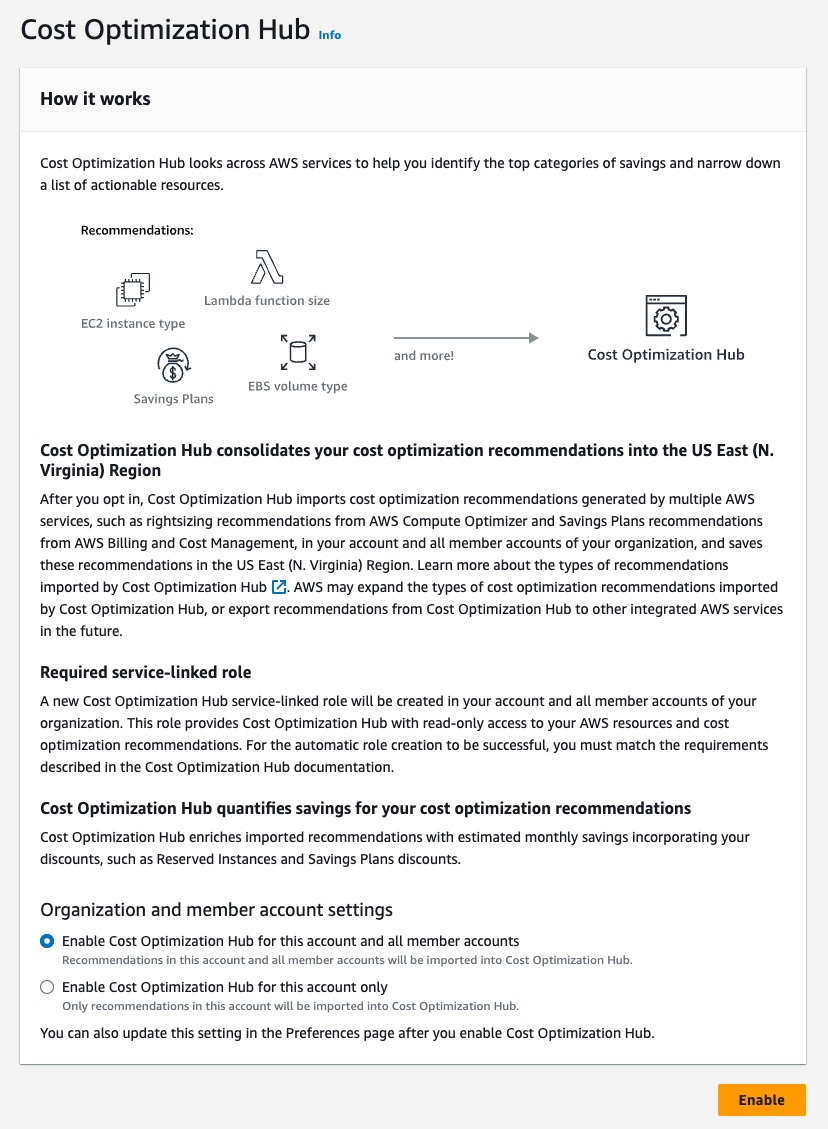
First, navigate to Cost Optimization Hub's enrolment page. Then you will see a page like this:
Opting in to Compute Optimizer

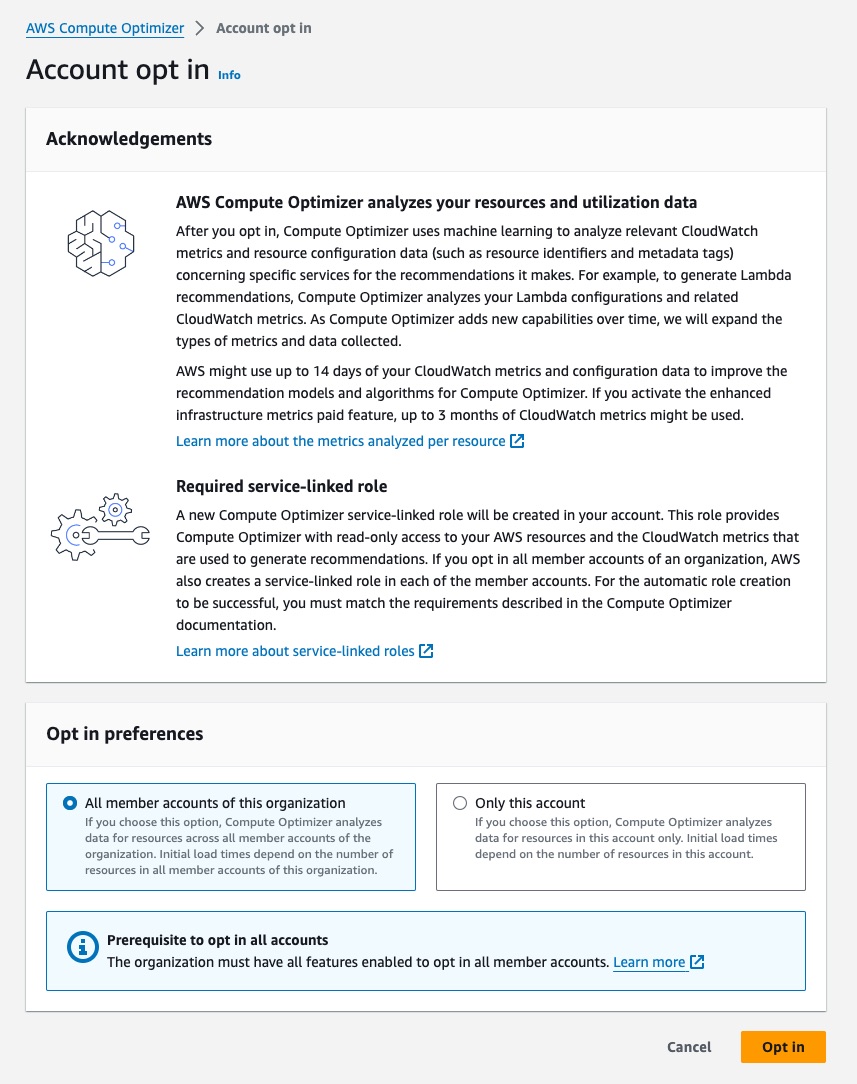
For Cost Optimization Hub to import recommendations from AWS Compute Optimizer, opt into the Compute Optimizer. To enable it, navigate to Compute Optimizer, click the Get Started button, and then Opt in.
What can I expect to see?

Now that you have enabled Cost Optimization Hub, you can see the recommendations in the dashboard. The initial processes can take up to 24 hours.

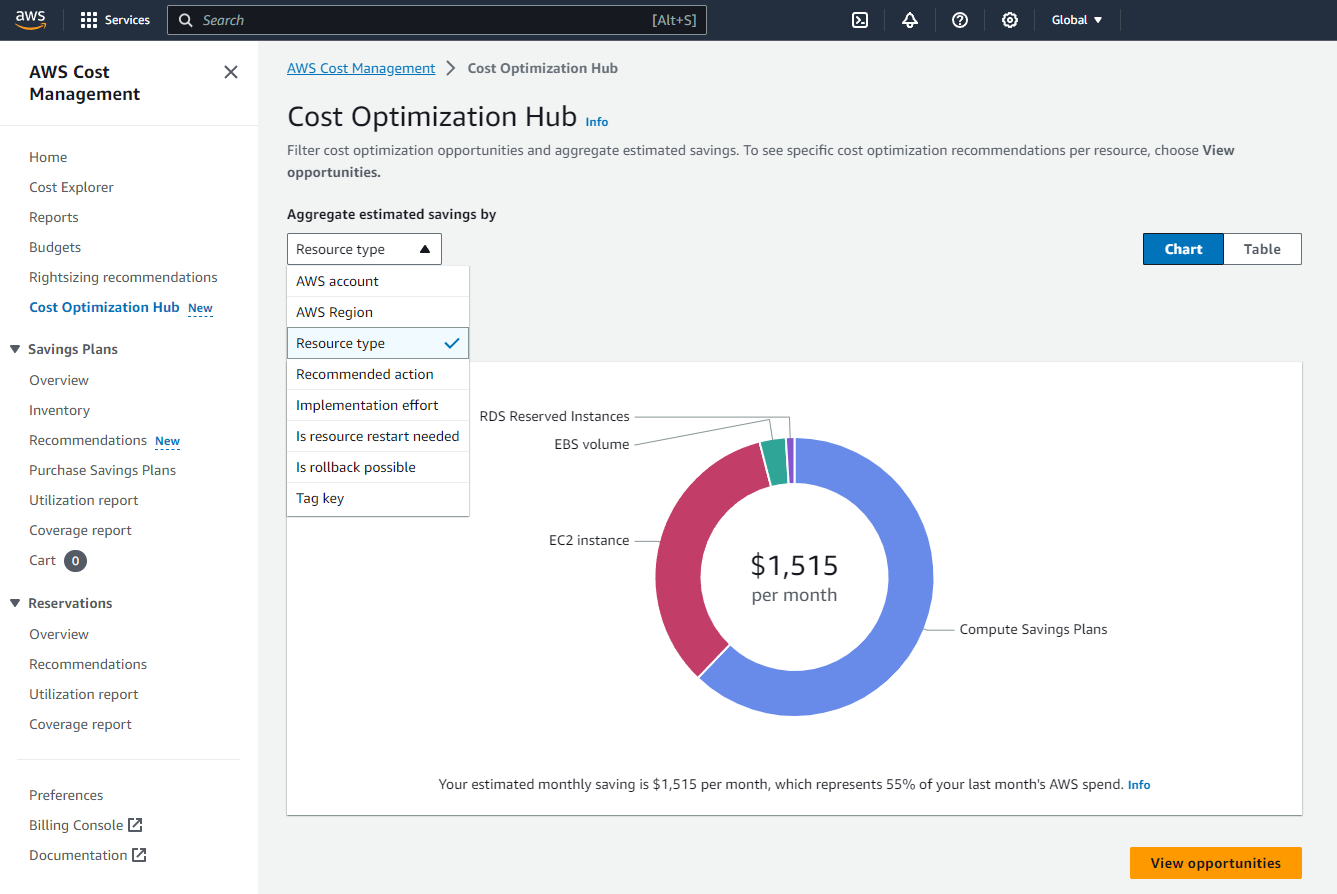
After waiting enough for AWS to finish the initial ingestion and process of cost/usage-related data across different regions and all your accessible accounts, based on this article, you can expect to see recommendations similar to this in your dashboard:
Source

To see the list of recommendations, choose View Opportunities.
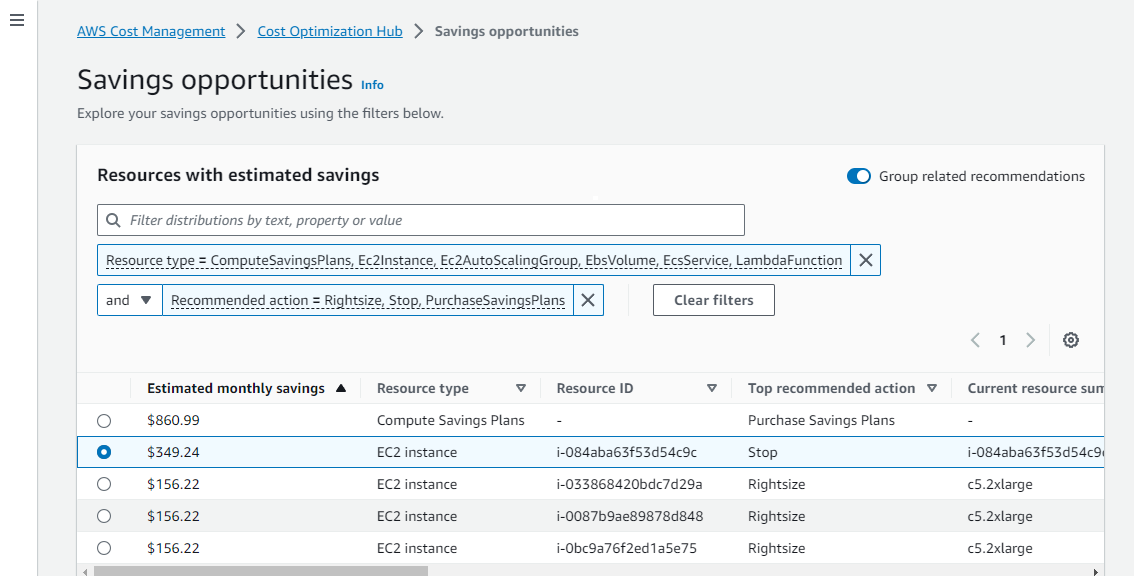
Source

If you select a specific resource, you can view details and even navigate directly to the representative console pages to take action.
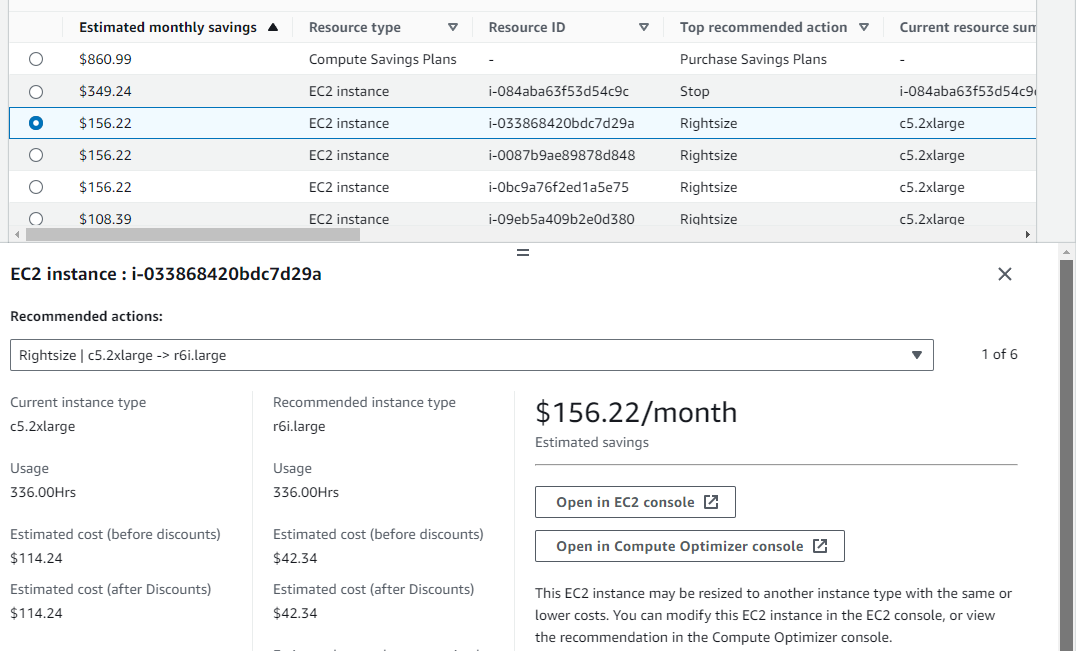
Source

If you are a command line guru, or if you want to quickly automate, you can also query through the AWS CLI or AWS SDKs.

Why was this interesting to me?

Last year, I built DigiWolk (service is permanently down - read further to see why), a cloud cost management platform to help companies have better visibility over what resources they use in the cloud and how to optimize their costs across all their accounts in their organization without sacrificing performance, security, or reliability.

As a non-EU citizen who resides in Denmark with a work permit, thanks to the stupidly bureaucratic EU/Danish/Dutch immigration regulations and xenophobic politicians who show no interest in welcoming non-EU talents and entrepreneurs, I could not get the required permission to start my company in Denmark and onboard customers (also tried the Netherlands), so after one year, AWS built the same thing.

Even though I am not happy that I could not start my company and help customers reduce their cloud costs, I am glad that AWS finally built this consolidated cost-optimization dashboard and made it available to everyone.

If you liked the article, feel free to share it with your friends, family, or colleagues. You can also follow me on Medium or LinkedIn.

Copyright & Disclaimer

  • All content provided on this article is for informational and educational purposes only. The author makes no representations as to the accuracy or completeness of any information on this site or found by following any link on this site.
  • All the content is copyrighted, except the assets and content I have referenced to other people's work, and may not be reproduced on other websites, blogs, or social media. You are not allowed to reproduce, summarize to create derivative work, or use any content from this website under your name. This includes creating a similar article or summary based on AI/GenAI. For educational purposes, you may refer to parts of the content, and only refer, but you must provide a link back to the original article on this website. This is allowed only if your content is less than 10% similar to the original article.
  • While every care has been taken to ensure the accuracy of the content of this website, I make no representation as to the accuracy, correctness, or fitness for any purpose of the site content, nor do I accept any liability for loss or damage (including consequential loss or damage), however, caused, which may be incurred by any person or organization from reliance on or use of information on this site.
  • The contents of this article should not be construed as legal advice.
  • Opinions are my own and not the views of my employer.
  • English is not my mother-tongue language, so even though I try my best to express myself correctly, there might be a chance of miscommunication.
  • Links or references to other websites, including the use of information from 3rd-parties, are provided for the benefit of people who use this website. I am not responsible for the accuracy of the content on the websites that I have put a link to and I do not endorse any of those organizations or their contents.
  • If you have any queries or if you believe any information on this article is inaccurate, or if you think any of the assets used in this article are in violation of copyright, please contact me and let me know.

AWS Cost Optimization Hub

AWS Cost Optimization Hub
Published: November 25, 2023

Today, AWS announced the AWS Cost Optimization Hub. A new feature in AWS Billing and Cost Management that makes it easy for you to identify, filter, aggregate, and quantify savings for AWS cost optimization recommendations across multiple AWS Regions and AWS accounts in your organizations without any data aggregation and processing. It provides a single dashboard where you can interactively query cost-related recommendations such as resource rightsizing, idle resource detection, and purchasing options. You can find out how much you’ll save if you implement those recommendations and easily compare and prioritize based on savings.

Policy to opt into Cost Optimization Hub

The following policy statement grants you access to opt into Cost Optimization Hub by giving you access to create the required service-linked role for opting in. It also grants access to the Cost Optimization Hub feature to update the enrollment status.

{ "Version": "2012-10-17", "Statement": { "Effect": "Allow", "Action": "iam:CreateServiceLinkedRole", "Resource": "arn:aws:iam::*/aws-service-role/cost-optimization-hub.bcm.amazonaws.com/AWSServiceRoleForCostOptimizationHub", "Condition": {"StringLike": {"iam:AWSServiceName": "cost-optimization-hub.bcm.amazonaws.com"}} }, { "Effect": "Allow", "Action": "iam:PutRolePolicy", "Resource": "arn:aws:iam::*/aws-service-role/cost-optimization-hub.bcm.amazonaws.com/AWSServiceRoleForCostOptimizationHub" }, { "Effect": "Allow", "Action": "cost-optimization-hub:UpdateEnrollmentStatus", "Resource": "*" } }

Also, currently, two AWS-managed policies exist that can help you get started with Cost Optimization Hub actions. One policy provides you with read-only access to Cost Optimization Hub, and the other policy provides you with admin access.

For more information, check out this link.

Let's enable it

First, navigate to Cost Optimization Hub's enrolment page. Then you will see a page like this:

Opting in to Compute Optimizer

For Cost Optimization Hub to import recommendations from AWS Compute Optimizer, opt into the Compute Optimizer. To enable it, navigate to Compute Optimizer, click the Get Started button, and then Opt in.

What can I expect to see?

Now that you have enabled Cost Optimization Hub, you can see the recommendations in the dashboard. The initial processes can take up to 24 hours.

After waiting enough for AWS to finish the initial ingestion and process of cost/usage-related data across different regions and all your accessible accounts, based on this article, you can expect to see recommendations similar to this in your dashboard:

Source

To see the list of recommendations, choose View Opportunities.

Source

If you select a specific resource, you can view details and even navigate directly to the representative console pages to take action.

Source

If you are a command line guru, or if you want to quickly automate, you can also query through the AWS CLI or AWS SDKs.

Why was this interesting to me?

Last year, I built DigiWolk (service is permanently down - read further to see why), a cloud cost management platform to help companies have better visibility over what resources they use in the cloud and how to optimize their costs across all their accounts in their organization without sacrificing performance, security, or reliability.

As a non-EU citizen who resides in Denmark with a work permit, thanks to the stupidly bureaucratic EU/Danish/Dutch immigration regulations and xenophobic politicians who show no interest in welcoming non-EU talents and entrepreneurs, I could not get the required permission to start my company in Denmark and onboard customers (also tried the Netherlands), so after one year, AWS built the same thing.

Even though I am not happy that I could not start my company and help customers reduce their cloud costs, I am glad that AWS finally built this consolidated cost-optimization dashboard and made it available to everyone.

If you liked the article, feel free to share it with your friends, family, or colleagues. You can also follow me on Medium or LinkedIn.

Copyright & Disclaimer

  • All content provided on this article is for informational and educational purposes only. The author makes no representations as to the accuracy or completeness of any information on this site or found by following any link on this site.
  • All the content is copyrighted, except the assets and content I have referenced to other people's work, and may not be reproduced on other websites, blogs, or social media. You are not allowed to reproduce, summarize to create derivative work, or use any content from this website under your name. This includes creating a similar article or summary based on AI/GenAI. For educational purposes, you may refer to parts of the content, and only refer, but you must provide a link back to the original article on this website. This is allowed only if your content is less than 10% similar to the original article.
  • While every care has been taken to ensure the accuracy of the content of this website, I make no representation as to the accuracy, correctness, or fitness for any purpose of the site content, nor do I accept any liability for loss or damage (including consequential loss or damage), however, caused, which may be incurred by any person or organization from reliance on or use of information on this site.
  • The contents of this article should not be construed as legal advice.
  • Opinions are my own and not the views of my employer.
  • English is not my mother-tongue language, so even though I try my best to express myself correctly, there might be a chance of miscommunication.
  • Links or references to other websites, including the use of information from 3rd-parties, are provided for the benefit of people who use this website. I am not responsible for the accuracy of the content on the websites that I have put a link to and I do not endorse any of those organizations or their contents.
  • If you have any queries or if you believe any information on this article is inaccurate, or if you think any of the assets used in this article are in violation of copyright, please contact me and let me know.
Copyright © 2025 - pooyan.info