Hire me
Pooyan Razian

Forget what you read? Breadcrumb helps

Forget what you read? Breadcrumb helps
Save a highlight to Breadcrumb from the right-click menu
Published: July 5, 2026

You read a great article about Kubernetes autoscaling in March. In July you remember the idea, but not the URL, the title, or even the exact words. You try Google again and hope you find the same page. Developers, students, and researchers hit this constantly: valuable knowledge disappears into browser history.

Breadcrumb is a free, open-source Google Chrome extension I built to fix that. Highlight text on any page, save it in one click, and find it again months later with plain-language search. Everything stays on your device. No account, no cloud upload.

Install from the Chrome Web Store · Source on GitHub

Who is it for?

  • Developers saving AWS docs, GitHub issues, Stack Overflow answers, blog posts
  • Students and researchers collecting notes across papers, courses, and articles
  • AI power users keeping insights from ChatGPT, Claude, or Gemini that would otherwise vanish

Breadcrumb does not try to change how you work. It captures value from what you already do: read, research, learn.

How to use it

1. Save a highlight

Select text on any page. Right-click and choose Save to Breadcrumb. The extension stores the text, page title, link, and timestamp locally.
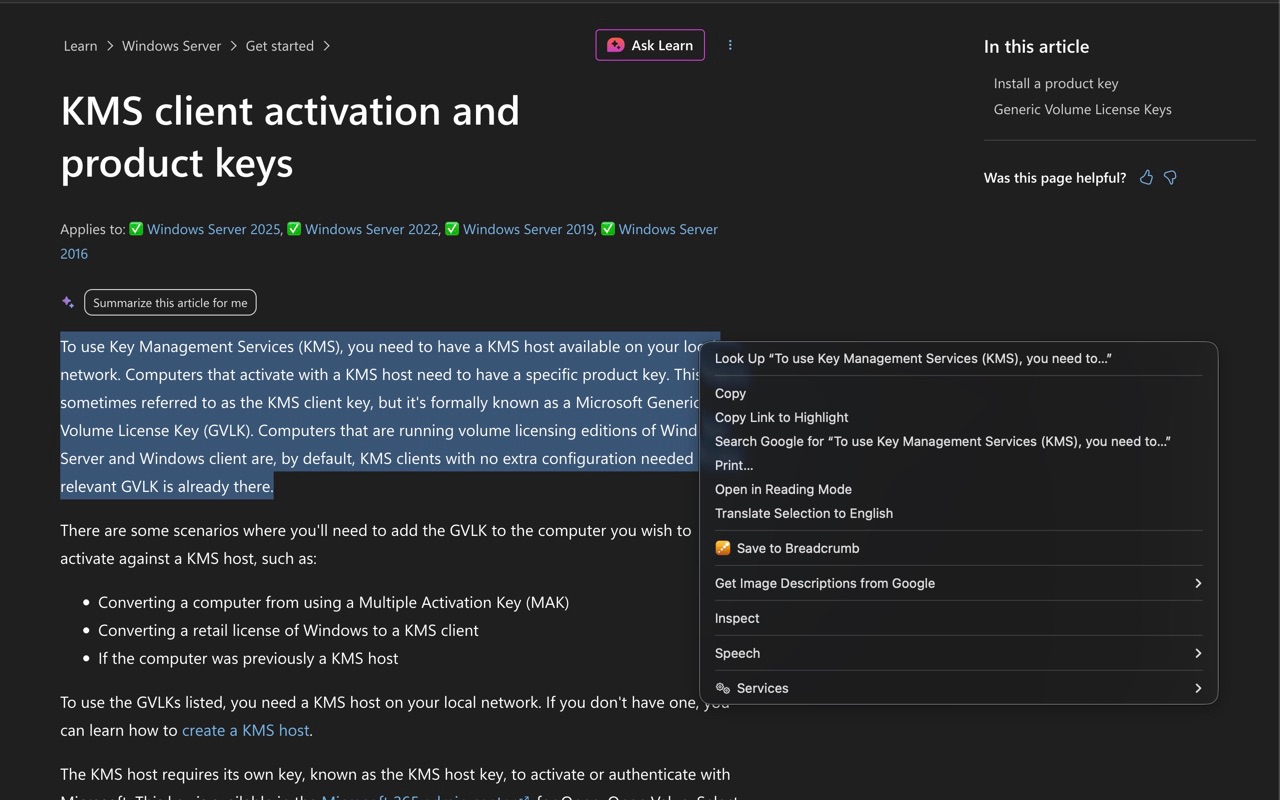
Save to Breadcrumb from the right-click menu
Save a highlight from the right-click menu

2. Open the popup

Click the Breadcrumb icon in your toolbar. Recent saves appear immediately. Search from here, or click Open library for the full view.

Turn on Semantic (AI) search in settings if you want meaning-based search, not just keywords. The AI runs on your device via Transformers.js. Nothing is uploaded.
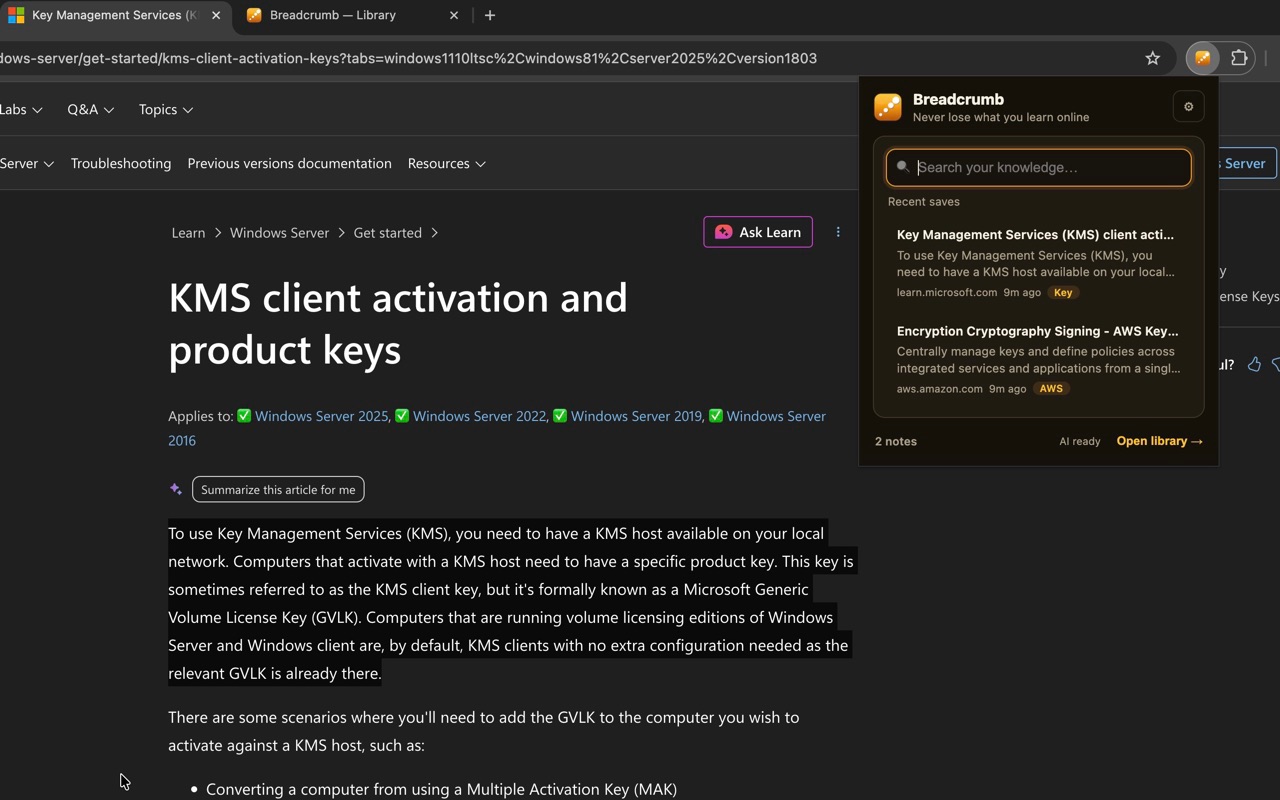
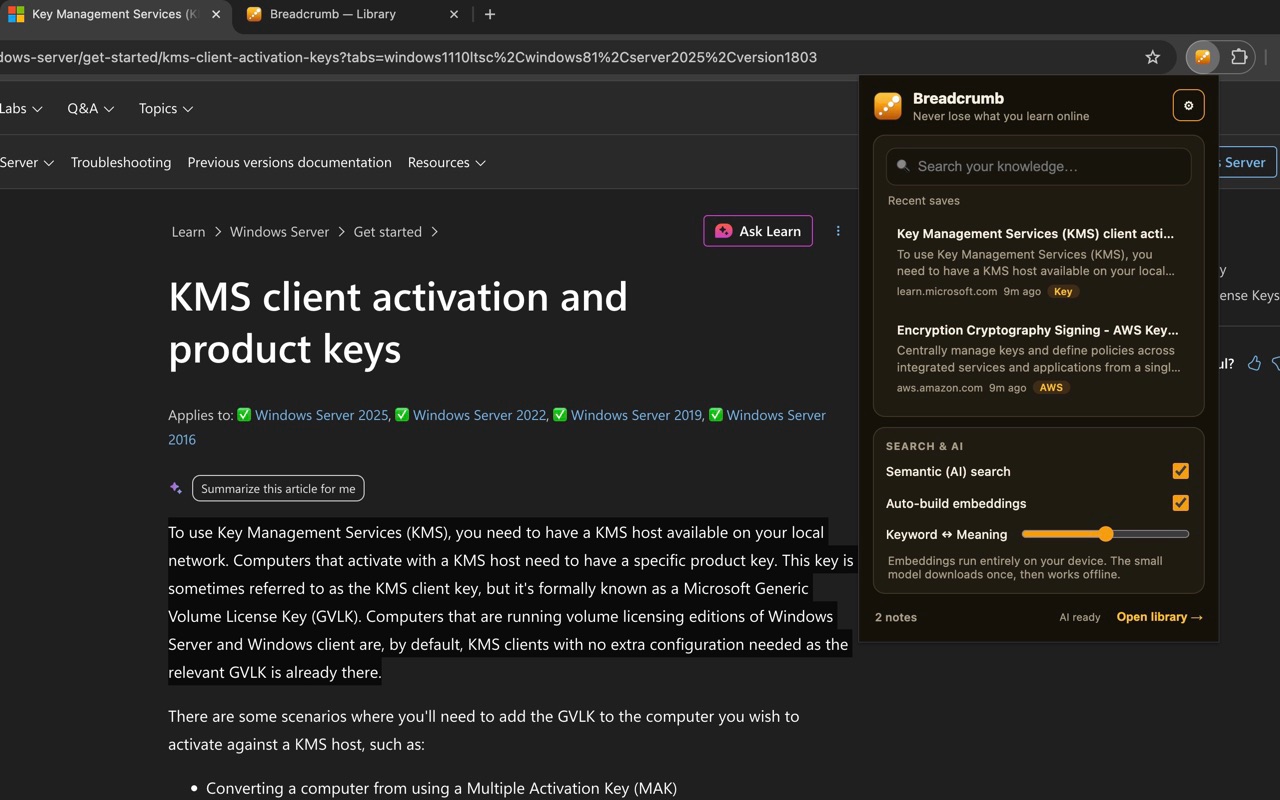
Recent saves in the Breadcrumb popup
Recent saves and quick search in the popup
Popup settings for AI search
Enable on-device semantic search in settings

3. Search your library

In the library, type what you remember, like aws or kubernetes autoscaling. Breadcrumb finds matching notes even when you do not recall the exact words. Use filters, tags, and the timeline on the right to see what you have been learning over time.
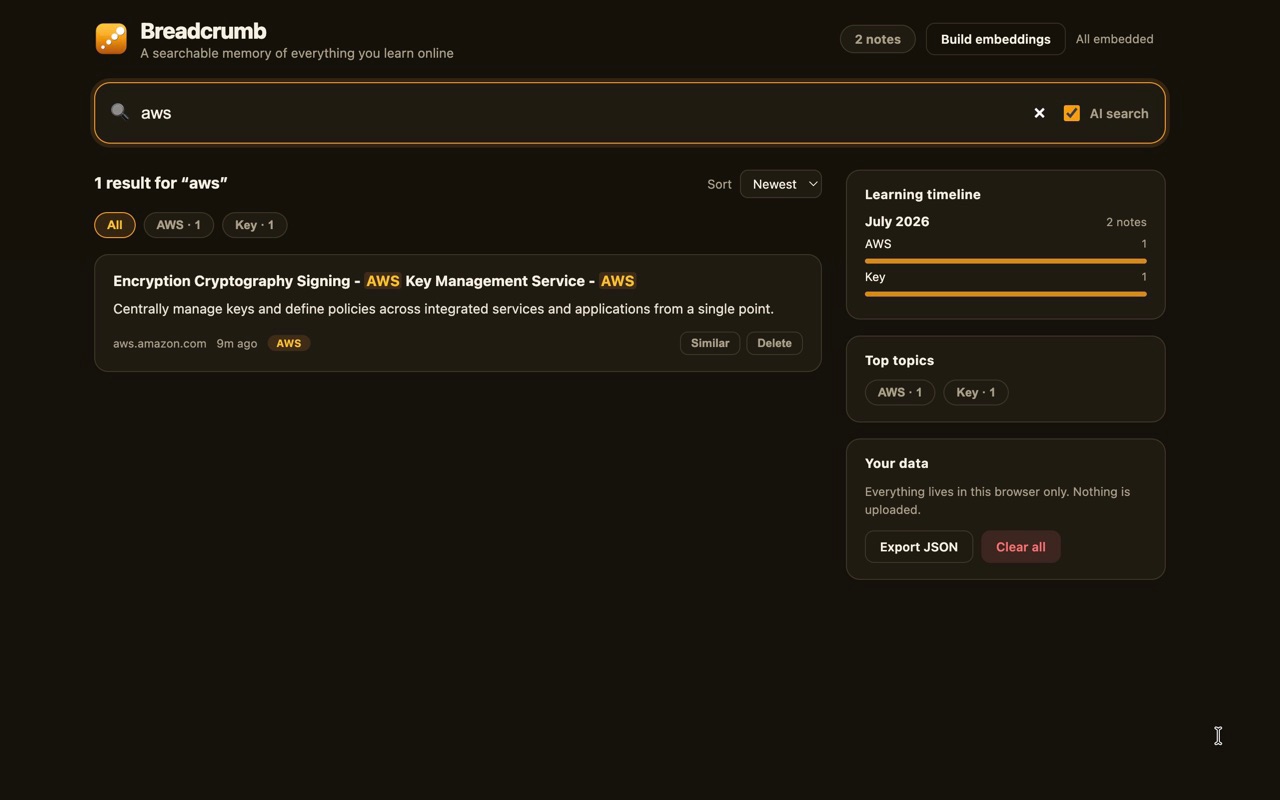
Search results in the Breadcrumb library
Search results in the library

That's it. Highlight, save, search. Your notes stay in your browser only.

What makes it different

  • Hybrid search blends keyword matching with semantic similarity in one ranked list
  • On-device AI using a small all-MiniLM-L6-v2 model. Works offline. No inference server
  • Similar notes shown when you save something related to an earlier highlight
  • Learning timeline with month-by-month breakdown and auto topic tags (AWS, Kubernetes, AI, Rust, and more)
  • Export and delete your data as JSON anytime

Privacy and permissions

Breadcrumb requests only storage, contextMenus, and activeTab. No host permissions, no browsing history tracking, no backend. Notes live in IndexedDB on your machine.

Open source

The project is MIT licensed. Built with WXT, TypeScript, Vitest, and GitHub Actions CI. Full tutorial: tutorial on GitHub.

If you liked the article, feel free to share it with your friends, family, or colleagues. You can also follow me on Medium or LinkedIn.

Copyright & Disclaimer

  • All content provided on this article is for informational and educational purposes only. The author makes no representations as to the accuracy or completeness of any information on this site or found by following any link on this site.
  • All the content is copyrighted, except the assets and content I have referenced to other people's work, and may not be reproduced on other websites, blogs, or social media. You are not allowed to reproduce, summarize to create derivative work, or use any content from this website under your name. This includes creating a similar article or summary based on AI/GenAI. For educational purposes, you may refer to parts of the content, and only refer, but you must provide a link back to the original article on this website. This is allowed only if your content is less than 10% similar to the original article.
  • While every care has been taken to ensure the accuracy of the content of this website, I make no representation as to the accuracy, correctness, or fitness for any purpose of the site content, nor do I accept any liability for loss or damage (including consequential loss or damage), however, caused, which may be incurred by any person or organization from reliance on or use of information on this site.
  • The contents of this article should not be construed as legal advice.
  • Opinions are my own and not the views of my employer.
  • English is not my mother-tongue language, so even though I try my best to express myself correctly, there might be a chance of miscommunication.
  • Links or references to other websites, including the use of information from 3rd-parties, are provided for the benefit of people who use this website. I am not responsible for the accuracy of the content on the websites that I have put a link to and I do not endorse any of those organizations or their contents.
  • If you have any queries or if you believe any information on this article is inaccurate, or if you think any of the assets used in this article are in violation of copyright, please contact me and let me know.

Forget what you read? Breadcrumb helps

Forget what you read? Breadcrumb helps
Save a highlight to Breadcrumb from the right-click menu
Published: July 5, 2026

You read a great article about Kubernetes autoscaling in March. In July you remember the idea, but not the URL, the title, or even the exact words. You try Google again and hope you find the same page. Developers, students, and researchers hit this constantly: valuable knowledge disappears into browser history.

Breadcrumb is a free, open-source Google Chrome extension I built to fix that. Highlight text on any page, save it in one click, and find it again months later with plain-language search. Everything stays on your device. No account, no cloud upload.

Install from the Chrome Web Store · Source on GitHub

Who is it for?

  • Developers saving AWS docs, GitHub issues, Stack Overflow answers, blog posts
  • Students and researchers collecting notes across papers, courses, and articles
  • AI power users keeping insights from ChatGPT, Claude, or Gemini that would otherwise vanish

Breadcrumb does not try to change how you work. It captures value from what you already do: read, research, learn.

How to use it

1. Save a highlight

Select text on any page. Right-click and choose Save to Breadcrumb. The extension stores the text, page title, link, and timestamp locally.

Save to Breadcrumb from the right-click menu
Save a highlight from the right-click menu

2. Open the popup

Click the Breadcrumb icon in your toolbar. Recent saves appear immediately. Search from here, or click Open library for the full view.

Turn on Semantic (AI) search in settings if you want meaning-based search, not just keywords. The AI runs on your device via Transformers.js. Nothing is uploaded.

Recent saves in the Breadcrumb popup
Recent saves and quick search in the popup
Popup settings for AI search
Enable on-device semantic search in settings

3. Search your library

In the library, type what you remember, like aws or kubernetes autoscaling. Breadcrumb finds matching notes even when you do not recall the exact words. Use filters, tags, and the timeline on the right to see what you have been learning over time.

Search results in the Breadcrumb library
Search results in the library

That's it. Highlight, save, search. Your notes stay in your browser only.

What makes it different

  • Hybrid search blends keyword matching with semantic similarity in one ranked list
  • On-device AI using a small all-MiniLM-L6-v2 model. Works offline. No inference server
  • Similar notes shown when you save something related to an earlier highlight
  • Learning timeline with month-by-month breakdown and auto topic tags (AWS, Kubernetes, AI, Rust, and more)
  • Export and delete your data as JSON anytime

Privacy and permissions

Breadcrumb requests only storage, contextMenus, and activeTab. No host permissions, no browsing history tracking, no backend. Notes live in IndexedDB on your machine.

Open source

The project is MIT licensed. Built with WXT, TypeScript, Vitest, and GitHub Actions CI. Full tutorial: tutorial on GitHub.

If you liked the article, feel free to share it with your friends, family, or colleagues. You can also follow me on Medium or LinkedIn.

Copyright & Disclaimer

  • All content provided on this article is for informational and educational purposes only. The author makes no representations as to the accuracy or completeness of any information on this site or found by following any link on this site.
  • All the content is copyrighted, except the assets and content I have referenced to other people's work, and may not be reproduced on other websites, blogs, or social media. You are not allowed to reproduce, summarize to create derivative work, or use any content from this website under your name. This includes creating a similar article or summary based on AI/GenAI. For educational purposes, you may refer to parts of the content, and only refer, but you must provide a link back to the original article on this website. This is allowed only if your content is less than 10% similar to the original article.
  • While every care has been taken to ensure the accuracy of the content of this website, I make no representation as to the accuracy, correctness, or fitness for any purpose of the site content, nor do I accept any liability for loss or damage (including consequential loss or damage), however, caused, which may be incurred by any person or organization from reliance on or use of information on this site.
  • The contents of this article should not be construed as legal advice.
  • Opinions are my own and not the views of my employer.
  • English is not my mother-tongue language, so even though I try my best to express myself correctly, there might be a chance of miscommunication.
  • Links or references to other websites, including the use of information from 3rd-parties, are provided for the benefit of people who use this website. I am not responsible for the accuracy of the content on the websites that I have put a link to and I do not endorse any of those organizations or their contents.
  • If you have any queries or if you believe any information on this article is inaccurate, or if you think any of the assets used in this article are in violation of copyright, please contact me and let me know.
Copyright © 2026 - pooyan.info