Hire me
Pooyan Razian

Have ADHD? Try Why Am I Here

Have ADHD? Try Why Am I Here
Set a goal while you browse
Published: July 4, 2026

You open Chrome to look up AWS pricing. Twenty minutes later you are on Reddit, email, and three unrelated tabs. Or the opposite: you stay on topic, but suddenly you have 40 AWS tabs open and no idea what you came for. Developers, students, and researchers know both patterns. People with ADHD know them especially well.

Why Am I Here? is a free, open-source Google Chrome extension I built to help. Set a goal in the popup, browse normally, and get a gentle nudge when you drift off task or stay on topic too long. No blocking, no shame, no system notifications. Just a ! badge on the icon and a check-in in the popup.

Install from the Chrome Web Store · Source on GitHub

Two problems, two nudges

ProblemWhat it feels likeWhat the extension does
DistractionYou came for AWS pricing but ended up on random tabsFocus nudge when off-goal time adds up and off-goal tabs outnumber on-goal ones
Rabbit holeYou are on topic but lost in 40 related tabsRabbit-hole check-in when you have spent a long time on-goal with many tabs open

Most tools catch only one. Blockers punish off-task browsing but ignore deep dives on the right topic. Timers do not know whether your tabs match your intent. This extension tracks both time and tab alignment against the goal you set.

How to use it

1. Set a goal

Click the ? icon in your toolbar. Type what you came to do, for example AWS pricing, and press Set goal (or Enter). The extension starts counting which tabs match and how long you spend on them.
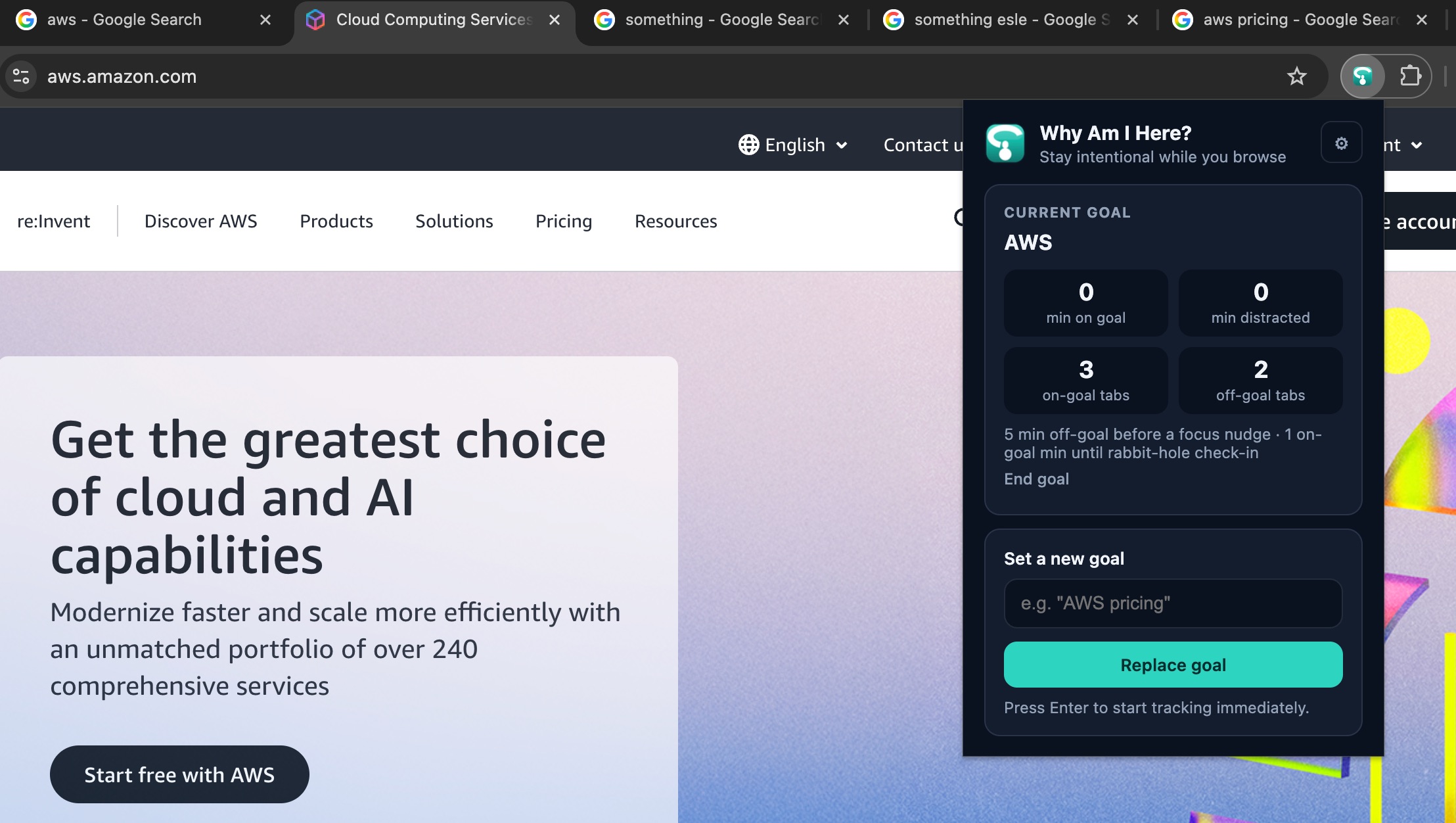
Set a goal while you browse

2. Browse like normal

Keep working. Open the popup anytime to see minutes on-goal vs distracted, and how many tabs are on-goal vs off-goal. Tracking runs in the background while Chrome is focused. Switching tasks? Set a new goal anytime. No need to end the old one first.
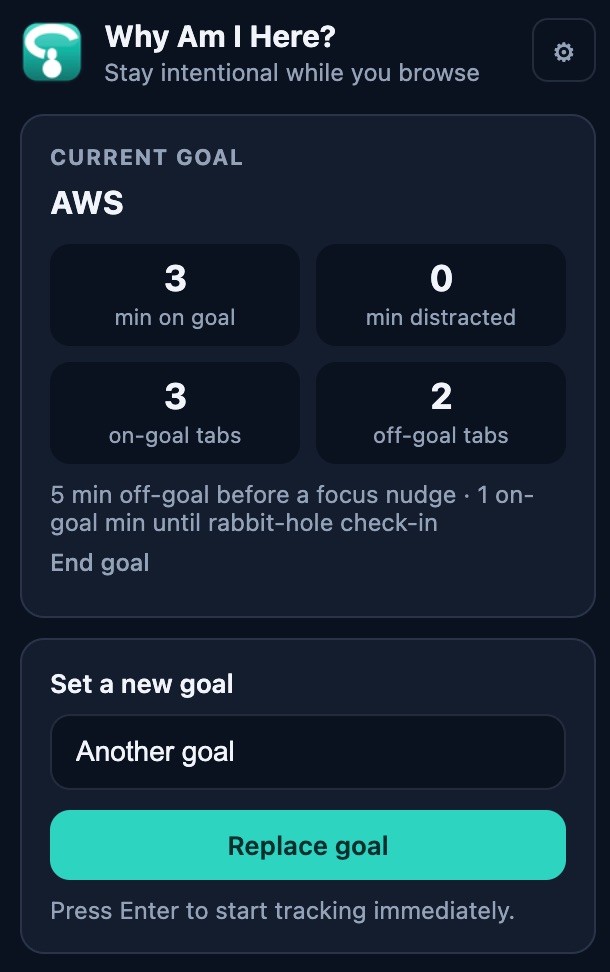
Current goal and live stats
Live stats: on-goal vs distracted time and tabs

3. Answer when it nudges you

When the icon shows !, open the popup.

  • Focus nudge: you drifted to off-goal tabs. Get back on task or tap Back on track to snooze.
  • Rabbit-hole check-in: you stayed on topic a long time with many tabs. Tap Done, Keep going, or Dismiss.
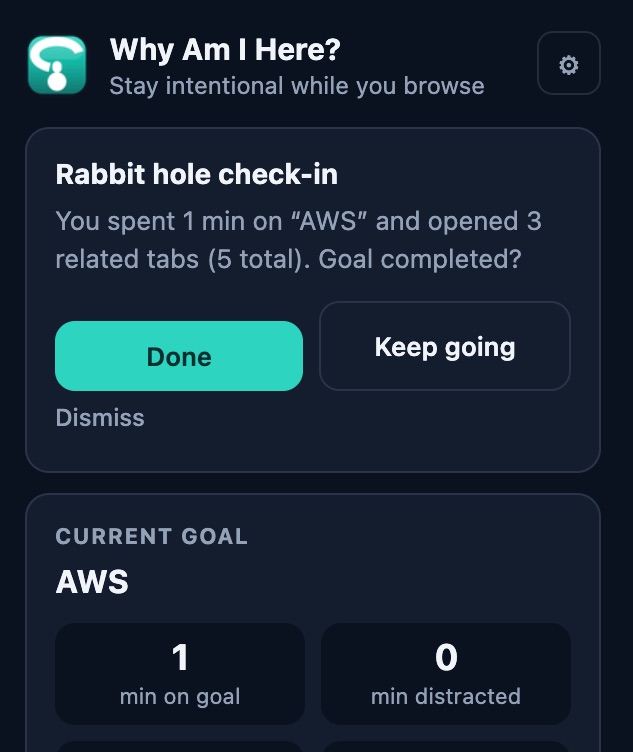
Rabbit-hole check-in
Rabbit-hole check-in when you have gone deep on a topic

Optional: adjust thresholds

Click the gear in the popup. Change distraction and rabbit-hole thresholds, then Save settings.
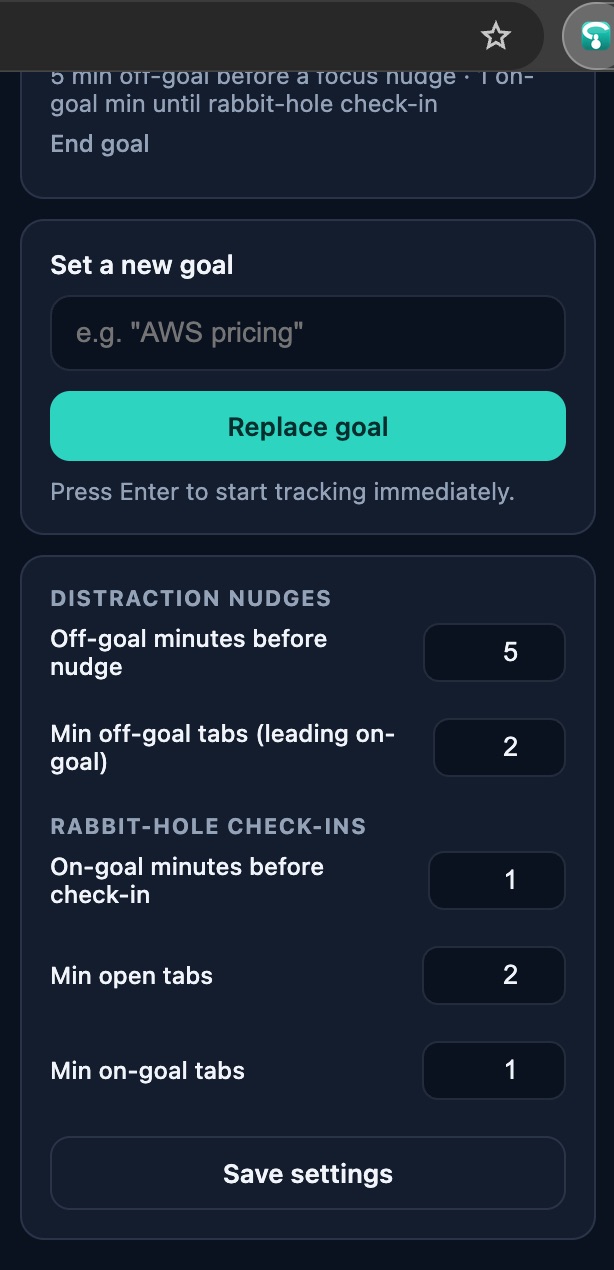
Settings
Configure when nudges fire

Privacy

Local-only storage. No accounts, analytics, or remote servers. Permissions are tabs, storage, and alarms only. No host permissions, no notification permission, no network access.

Important disclaimer

This is a personal productivity tool, not a medical device. It is not FDA approved, not a diagnostic tool, and not a substitute for professional care. I built it from publicly known ideas about focus, tab switching, and self-regulation while browsing. It may help some people with ADHD or anyone who loses track online, but your experience will vary.

Open source

MIT licensed. Built with WXT, TypeScript, and Vitest. Full tutorial: tutorial on GitHub.

If you want to read what researchers say about focus, tabs, and ADHD online, these are worth a look:

These sources informed the general idea behind the extension. They do not endorse or validate this specific tool.
If you liked the article, feel free to share it with your friends, family, or colleagues. You can also follow me on Medium or LinkedIn.

Copyright & Disclaimer

  • All content provided on this article is for informational and educational purposes only. The author makes no representations as to the accuracy or completeness of any information on this site or found by following any link on this site.
  • All the content is copyrighted, except the assets and content I have referenced to other people's work, and may not be reproduced on other websites, blogs, or social media. You are not allowed to reproduce, summarize to create derivative work, or use any content from this website under your name. This includes creating a similar article or summary based on AI/GenAI. For educational purposes, you may refer to parts of the content, and only refer, but you must provide a link back to the original article on this website. This is allowed only if your content is less than 10% similar to the original article.
  • While every care has been taken to ensure the accuracy of the content of this website, I make no representation as to the accuracy, correctness, or fitness for any purpose of the site content, nor do I accept any liability for loss or damage (including consequential loss or damage), however, caused, which may be incurred by any person or organization from reliance on or use of information on this site.
  • The contents of this article should not be construed as legal advice.
  • Opinions are my own and not the views of my employer.
  • English is not my mother-tongue language, so even though I try my best to express myself correctly, there might be a chance of miscommunication.
  • Links or references to other websites, including the use of information from 3rd-parties, are provided for the benefit of people who use this website. I am not responsible for the accuracy of the content on the websites that I have put a link to and I do not endorse any of those organizations or their contents.
  • If you have any queries or if you believe any information on this article is inaccurate, or if you think any of the assets used in this article are in violation of copyright, please contact me and let me know.

Have ADHD? Try Why Am I Here

Have ADHD? Try Why Am I Here
Set a goal while you browse
Published: July 4, 2026

You open Chrome to look up AWS pricing. Twenty minutes later you are on Reddit, email, and three unrelated tabs. Or the opposite: you stay on topic, but suddenly you have 40 AWS tabs open and no idea what you came for. Developers, students, and researchers know both patterns. People with ADHD know them especially well.

Why Am I Here? is a free, open-source Google Chrome extension I built to help. Set a goal in the popup, browse normally, and get a gentle nudge when you drift off task or stay on topic too long. No blocking, no shame, no system notifications. Just a ! badge on the icon and a check-in in the popup.

Install from the Chrome Web Store · Source on GitHub

Two problems, two nudges

ProblemWhat it feels likeWhat the extension does
DistractionYou came for AWS pricing but ended up on random tabsFocus nudge when off-goal time adds up and off-goal tabs outnumber on-goal ones
Rabbit holeYou are on topic but lost in 40 related tabsRabbit-hole check-in when you have spent a long time on-goal with many tabs open

Most tools catch only one. Blockers punish off-task browsing but ignore deep dives on the right topic. Timers do not know whether your tabs match your intent. This extension tracks both time and tab alignment against the goal you set.

How to use it

1. Set a goal

Click the ? icon in your toolbar. Type what you came to do, for example AWS pricing, and press Set goal (or Enter). The extension starts counting which tabs match and how long you spend on them.

Set a goal while you browse

2. Browse like normal

Keep working. Open the popup anytime to see minutes on-goal vs distracted, and how many tabs are on-goal vs off-goal. Tracking runs in the background while Chrome is focused. Switching tasks? Set a new goal anytime. No need to end the old one first.

Current goal and live stats
Live stats: on-goal vs distracted time and tabs

3. Answer when it nudges you

When the icon shows !, open the popup.

  • Focus nudge: you drifted to off-goal tabs. Get back on task or tap Back on track to snooze.
  • Rabbit-hole check-in: you stayed on topic a long time with many tabs. Tap Done, Keep going, or Dismiss.
Rabbit-hole check-in
Rabbit-hole check-in when you have gone deep on a topic

Optional: adjust thresholds

Click the gear in the popup. Change distraction and rabbit-hole thresholds, then Save settings.

Settings
Configure when nudges fire

Privacy

Local-only storage. No accounts, analytics, or remote servers. Permissions are tabs, storage, and alarms only. No host permissions, no notification permission, no network access.

Important disclaimer

This is a personal productivity tool, not a medical device. It is not FDA approved, not a diagnostic tool, and not a substitute for professional care. I built it from publicly known ideas about focus, tab switching, and self-regulation while browsing. It may help some people with ADHD or anyone who loses track online, but your experience will vary.

Open source

MIT licensed. Built with WXT, TypeScript, and Vitest. Full tutorial: tutorial on GitHub.

If you want to read what researchers say about focus, tabs, and ADHD online, these are worth a look:

These sources informed the general idea behind the extension. They do not endorse or validate this specific tool.

If you liked the article, feel free to share it with your friends, family, or colleagues. You can also follow me on Medium or LinkedIn.

Copyright & Disclaimer

  • All content provided on this article is for informational and educational purposes only. The author makes no representations as to the accuracy or completeness of any information on this site or found by following any link on this site.
  • All the content is copyrighted, except the assets and content I have referenced to other people's work, and may not be reproduced on other websites, blogs, or social media. You are not allowed to reproduce, summarize to create derivative work, or use any content from this website under your name. This includes creating a similar article or summary based on AI/GenAI. For educational purposes, you may refer to parts of the content, and only refer, but you must provide a link back to the original article on this website. This is allowed only if your content is less than 10% similar to the original article.
  • While every care has been taken to ensure the accuracy of the content of this website, I make no representation as to the accuracy, correctness, or fitness for any purpose of the site content, nor do I accept any liability for loss or damage (including consequential loss or damage), however, caused, which may be incurred by any person or organization from reliance on or use of information on this site.
  • The contents of this article should not be construed as legal advice.
  • Opinions are my own and not the views of my employer.
  • English is not my mother-tongue language, so even though I try my best to express myself correctly, there might be a chance of miscommunication.
  • Links or references to other websites, including the use of information from 3rd-parties, are provided for the benefit of people who use this website. I am not responsible for the accuracy of the content on the websites that I have put a link to and I do not endorse any of those organizations or their contents.
  • If you have any queries or if you believe any information on this article is inaccurate, or if you think any of the assets used in this article are in violation of copyright, please contact me and let me know.
Copyright © 2026 - pooyan.info