You might be in the middle of the process of migrating from a monolith application or a handful of services to a microservice architecture, and you might have good reasons for it. You have heard this new architecture can help with decoupling business logic into a number of least-dependent services that can be developed, deployed, and scaled independently. You might have already gone a step further and have already built your few new services and have them running locally using tools like Docker Compose. Everything seems fine at this stage and working with Docker containers seems easy, so now you are more confident to move this to production, but you are asking yourself if anything else is needed for a production environment?
Running containers locally is easy. You can simply use Docker Compose and simply run as many services as you need, but when it comes to running them on production you need great tooling to deal with the heavy lifting and provide a common, baseline functionality. In production, you need to know what version has been deployed? What rollout strategy you want? Canary? Blue/Green? Rolling update? What if the application crashes? What if the underlying host fails? What if a datacenter-scale disaster happens? Are we using the latest versions of packages? How do we patch the operating systems? How should we handle different levels and more importantly unpredictable spikes of load? With higher number of dynamically moving parts that the microservice architecture brings, resource allocation and resiliency can become challenging, so you need to improve testing, monitoring, traceability, visibility, and automation. In this article I will focus on the container orchestrator itself only, which is needed to manage the lifecycle of your containers, where they should be placed, and if they should scale due to the traffic load. If you do not utilize automation with CI/CD pipelines and a container orchestrator, developers and system administrators will have to invest vast amounts of time on manual processes and that usually needs a high level of collaboration and coordination.

This article is for you if you want to adapt containers and migrate from either bare-metal or virtual machines. I will share my thoughts on how to choose the right orchestrator based on the size of your team and the infrastructure you use. Let me know if you have a different opinion or if you think a statement in this article is incorrect.
What options do I have?
ECS - In 2015, the initial version of ECS was released. ECS is an AWS-opinionated solution, designed for simplicity, and is only available on AWS cloud. It is well integrated with AWS services like ALB, NLB, CloudWatch, and more. It can be used as a fully serverless solution if Fargate launch type is selected. AWS handles the operations, availability, patching, scalability, and security of the underlying infrastructure. If more control over configurations and the choice of hardware is needed, you can use EC2 launch type. You can also try Amazon ECS for simple projects by using AWS Copilot.
Kubernetes - In 2015, Kubernetes (k8s) was released as a collaborative open source solution between Google and Linux Foundation to form the Cloud Native Computing Foundation (CNCF), and then in 2016 Helm was released as a package manager for it. Kubernetes was built to promise keeping the placement and condition of containers in a desired state. Kubernetes offers support for only specific platform types and has been built to run Linux containers. Kubernetes is mainly chosen because of its vibrant ecosystem and community, consistent open source APIs, and broad flexibility. Even though it is the one of the most popular solution from the list, it is also one of the most architecturally-complex option. You should bear in mind each public cloud provider has implemented their own version of Kubernetes (GKE, EKS, and AKS), and they only share the core functionalities.
Docker Swarm - Swarm is built into Docker by default and brings different features in the paid and unpaid versions.
Nomad - Nomad is platform-agnostic toolkit built by Hashicorp for building highly scalable clusters. It is well integrated with their ecosystem, and only with their systems. That means, for service discovery, you have to add on Consul, and for secret management, you need to add on Vault. Also, some features like namespaces are only available in the enterprise version.
Marathon on Mesos - Marathon is a production-grade container orchestration platform for Mesosphere's Datacenter Operating System (DC/OS) and Apache Mesos. Mesos is a highly scalable clustering system for running any type of tasks. It relies on frameworks to support different kinds of tasks, and Marathon is the plugin that provides the support for container orchestration within the Mesos ecosystem.
Titus - A few years ago Netflix open-sourced their internal orchestration system. Titus was designed to provide the tightest of integrations with the Amazon AWS infrastructure where Netflix maintains its operations.
Rancher - Rancher is an open source container management platform built for organizations that deploy containers in production. Rancher makes it easy to run Kubernetes everywhere, meet IT requirements, and empower DevOps teams.
Pharos Cluster - Pharos Cluster is a Ruby-based Kontena Pharos (Kubernetes distribution) management tool. It handles cluster bootstrapping, upgrades and other maintenance tasks via SSH connection and Kubernetes API access.
Compute options on AWS
If AWS is your chosen cloud provider and if you want to use either ECS or EKS, based on this article you can run your containers on the following compute options:
AWS Fargate - A "serverless" container compute engine where you only pay for the resources required to run your containers. Suited for customers who do not want to worry about managing servers, handling capacity planning, or figuring out how to isolate container workloads for security.
EC2 instances - Offers widest choice of instance types including processor, storage, and networking. Ideal for customers who want to manage or customize the underlying compute environment and host operating system.
AWS Outposts - You can run your containers using AWS infrastructure on premises for a consistent hybrid experience. Suited for customers who require local data processing, data residency, and hybrid use cases.
AWS Local Zones - An extension of an AWS Region, suited for customers who need the ability to place resources in multiple locations closer to end users.
AWS Wavelength - Ultra-low-latency mobile edge computing, suited for 5G applications, interactive and immersive experiences, and connected vehicles.
What requirements to consider
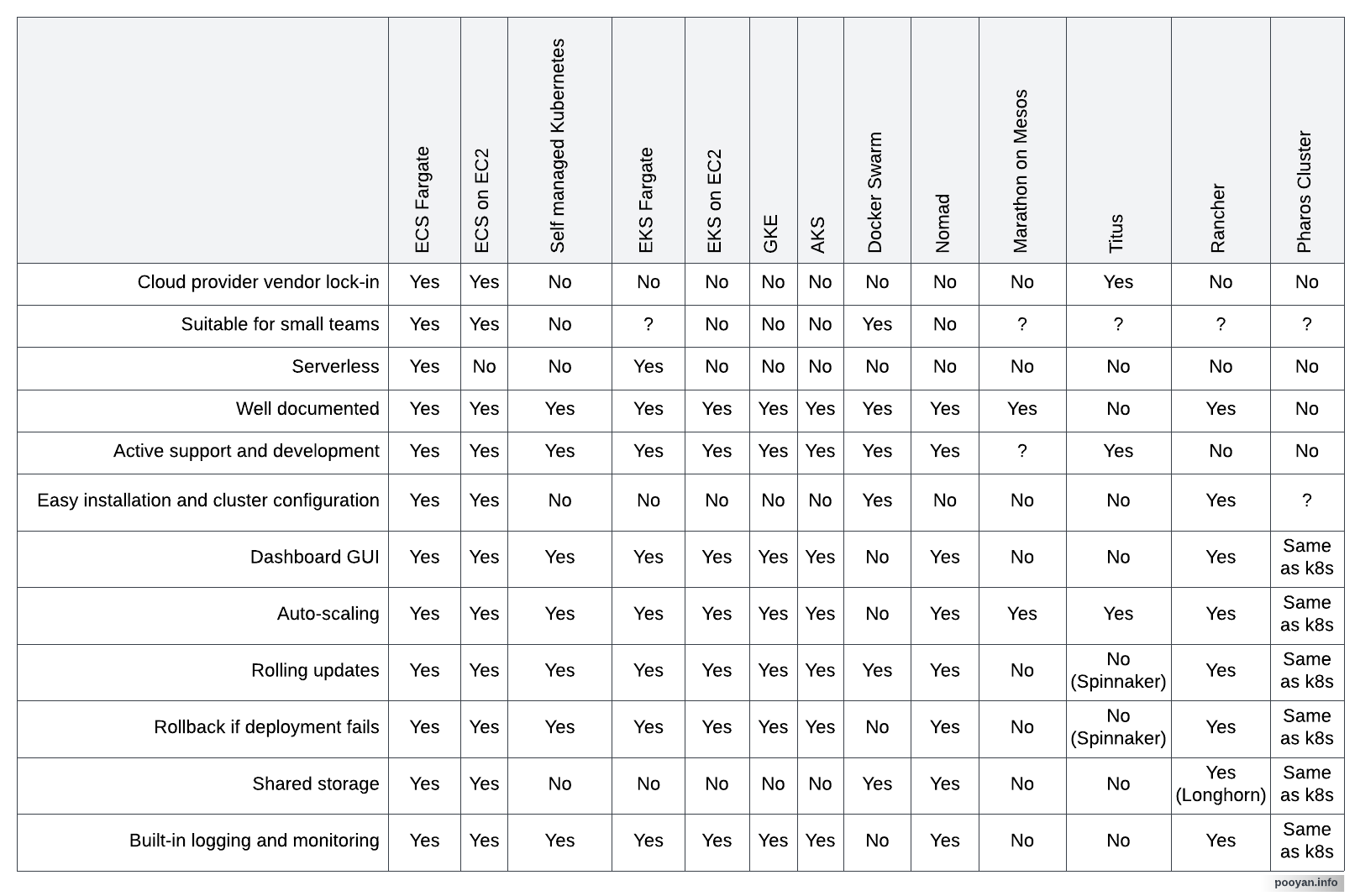
No cloud vendor lock-in - Are you planning to keep using the same cloud provider for the next 5 years? If yes, this might not be a deal-breaker for you, but predicting the future is not always easy. You also need to keep in mind we always have a level of vendor lock-in somewhere, either in the frameworks we use, the tooling we use, or any sort of the providers we use, including the choice of public cloud provider.
Size of the team - Do you have a large number of teams with enough number of system administrators? If not, you should probably avoid doing all the work yourself and rely on existing already-tested fully-managed or semi-managed solutions and mainly focus on things that matter the most to your business.
Serverless or not? - Managing infrastructure is a critical thing, and it needs a lot of time from the smart people you have hired to do so. That means, if you only have a few people who can confidently manage your infrastructure, especially if you have less than two senior system administrators, you would better choose a serverless solution to handle most of the job for you. For instance if you use AWS only, you can use ECS/EKS with Fargate launch type, if you do not have a need for a special hardware or any other special needs. If you need a special hardware that is not supported by Fargate, if you need very low latencies, or if you are supposed to have a hybrid solution you have to choose from other options.
Active development - The container orchestration world is relatively young. Inactive projects will quickly fall behind and signify that bugs are not being addressed. They are also slow in discovering vulnerabilities and responding to security threats.
Simplicity of installation and configuration - The more complex a system, the harder it will be to configure and maintain it. That means not only the cost of operation will increase, but also you will have to accept a higher level of risks caused by human error.
Dashboard GUI - Does the orchestrator provide a dashboard to monitor and manage from a simple GUI? If not, everyone will have to rely on a few geeks who know how to manage and debug from the terminal. That means debugging will become more complicated, and you can only hire highly-experienced people even for simple daily routines.
Auto scaling - You should ask yourself if you can always predict the load and if you want to deal with manual scaling by yourself or do you want your tool to be able to do it for you?
Shared storage - Is it possible to mount EFS or any other filesystem between containers of different services? For instance Kubernetes only allows you to share filesystem between pods. Ideally, you should not need this, but it can be an important factor if you have stateful or tightly-coupled services that are not independent of each other, so they should have a need to write concurrently on the same filesystem.
Rolling updates and rollback - You should ask yourself if the tool can handle rolling updates and automatic rollback in case of failure. This is an important factor especially for achieving a higher rate of availability.
Built-in logging and monitoring - It can make life much easier if the tool itself can provide built-in functionalities for logging and monitoring, otherwise you should check how it can be integrated with 3rd-party solutions to handle this for you.
Conclusion
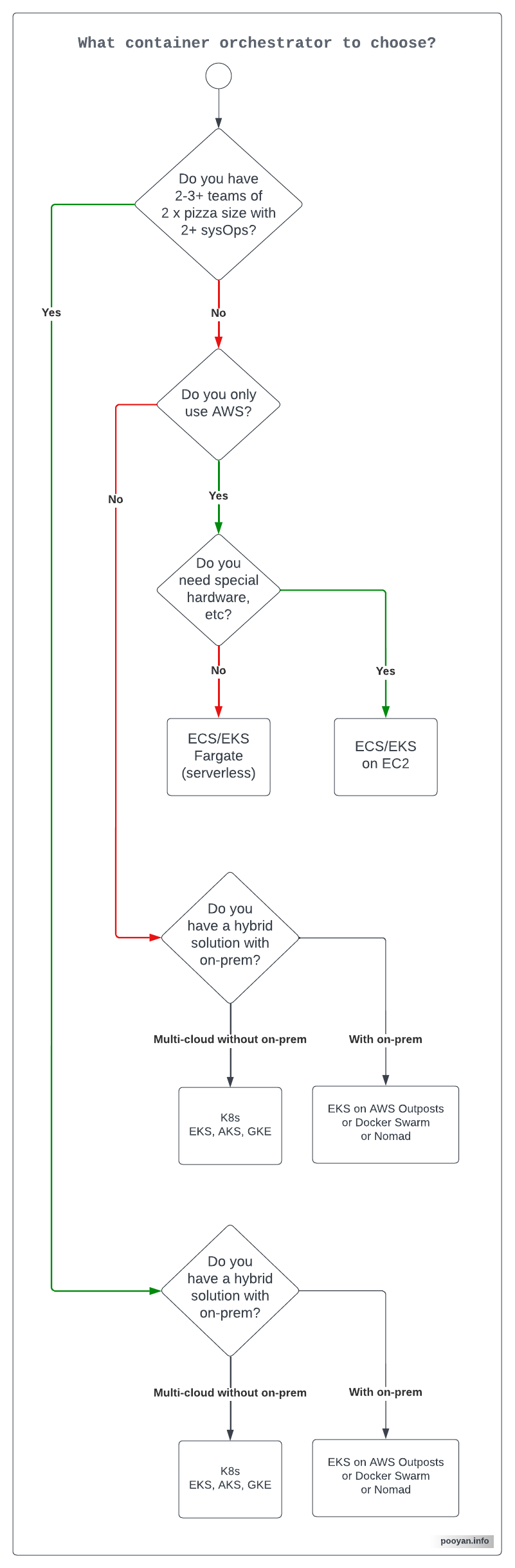
In my opinion, if you only have a few developers and one or no system administrators in your team, it is better to choose a serverless solution like ECS/EKS with Fargate launch type. ECS can bring more simplicity compared to EKS, if you only use AWS. If you have a large number of teams or if you have a multi-cloud or a hybrid solution, you can either choose from a managed Kubernetes solution like EKS, AKS, or GKE or you can use Hashicorp's Nomad or Docker Swarm, especially if you should manage containers on-prem. Even though self-managing Kubernetes is possible, but handling load balancers and integrating with other systems can become a time-consuming pain. Here is a quick comparison of the existing options:
Below is a generic recommendation I can give for deciding what container orchestration tool to choose based on the current status of existing options in 2022. That's why I have not included Marathon, Titus, Rancher, and Pharos. This might change in the future and also can be different from company to company based on their requirements, values, and existing tooling ecosystem. Please feel free to reach out to me if you want to have a talk about this.
Credits and copyright notes
- This article is influenced by the "How to choose the right container orchestration and how to deploy it" article written in 2018 by Michael Douglass.
- First image's source.
- Second image's source.
- Second image's original copyright notes.
- You can reuse the last two images, but please put a link to this article.