
Fixing HTTP 504 errors can be challenging due to the fact that you usually cannot find a simple entry in logs that specifies where exactly the root cause should be. This can become even more challenging if you have recently updated the architecture or migrated to a new platform because typically multiple layers should be investigated. In this article I will share some common reasons and a checklist to go through.
The most common cause of an HTTP "504 Gateway Timeout" is a webserver that is not responding in the expected time. That can happen if the server responds after the load balancer times out, if a proxy times out, or if the webserver times out while waiting for an underlying layer to respond.
We all know people have no time to waste on a slow system, so bear in mind having slow responses can kill your business. That means you should always prioritize optimizing performance of your code, queries, and databases. That means, if relational databases are used, developers should check how the application queries the database, if proper indexes are used, and if you run full table scan. Although this might not always be the case, and for some reason you might have "known" long-lasting request-responses. In that scenario it is advised to move them to a command and run them asynchronously as a background job. This way you can return fast and update the user when the job is done. Even though this is the recommended way, you might have an old system that has some "known" long-lasting requests and the application team cannot change them overnight, so the business might ask you to find a temporary solution until they can update the code. In that case you should increase timeouts in different layers, but please bear in mind that can potentially open up security risks to the whole system. You should also check if there are any bottlenecks in the network. Unless from the logs you have a proper reason, I suggest you start increasing timeout values from the outer layer and move to the underlying layers one by one. This way when the error is fixed, you know which layers were involved, so you can more easily find the root cause.
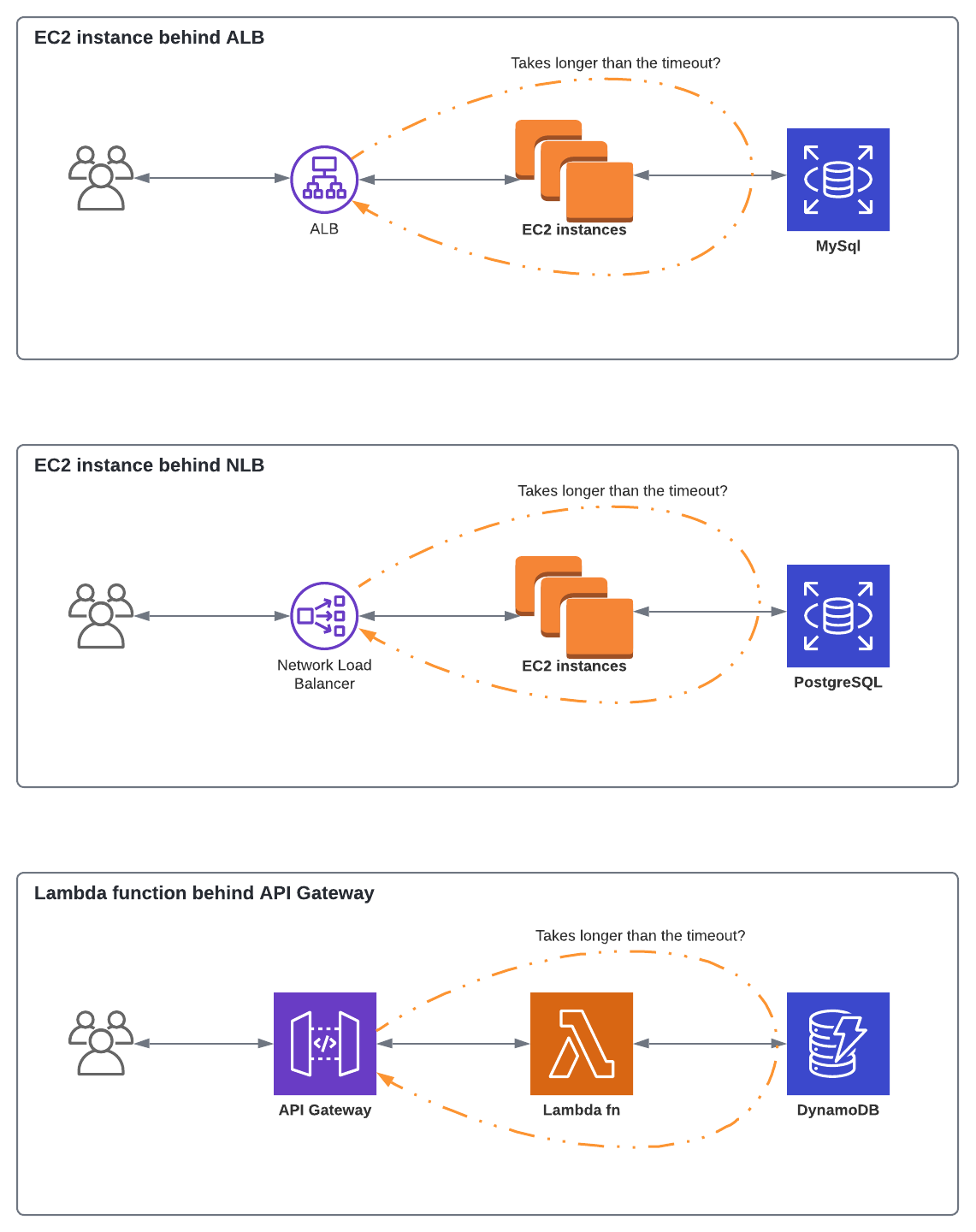
Image 2 shows three simple examples of a synchronous request/response. The first one is an EC2 instance or a group of instances behind an Application Load Balancer. When a request is initiated by the client, the request is routed towards the ALB. Then ALB forwards the request to webservers, and it might need to query the database or perform a network call to a remote server. Meanwhile, ALB keeps waiting for the response until it either receives the response or reaches the timeout. The latter results in an HTTP 504. Similarly, this can happen to any of the underlying layers, or if we have Network Load Balancer instead of an ALB, or if we use Amazon API Gateway in front of EC2 instances or Lambda functions.
As the first step, if a load balancer is placed in front of your servers, you should check the max timeout there. If you use AWS, the default value for ALB is 60 seconds (can be increased) and the default value for NLB is 350 seconds (cannot be changed).
Then, if you have a full-blown serverless architecture with ephemeral compute resources and the target is either a Lambda function, an Azure Function, or a Google Cloud Function, you should check if the service can respond before the connection timeout expires.
If you use containerization orchestrators like ECS, EKS, in some scenarios this might happen if a container is being killed while processing a request that has successfully been initiated by the client.
If the error happens on all requests, you might also check network firewall rules. For example, on AWS you should check if the network ACL for the subnet did not allow traffic from the targets to the load balancer nodes on the ephemeral ports (1024-65535).
This error can also happen if you use a reverse proxy like Nginx, Envoy, ... either when in a simple scenario Nginx is placed as a reverse proxy in front of php-fpm or in a microservice architecture when Envoy or something similar is placed as a sidecar next to your containers.
Another scenario would be if the target returns a content-length header that is larger than the entity body.
In that scenario the load balancer might time out while waiting for the missing bytes.
For interpreted programming languages like PHP and Python, the next step would be checking the connection between the webserver and the underlying layer. For example if you have an old setup with Apache with mod_php, mod_python, Apache webserver might time out before PHP or Python respond.
Bear in mind, in most cases the default timeout value for Apache is 60 seconds and for Apache Tomcat is 30 seconds, but this can be different from version to version.
The error might also happen if the connection between the webserver, php, python, ... times out before database responds to the request. As the next step, you should check the timeout settings on the database engine itself.
If you use PHP, in the loaded php.ini file, you should also check max_execution_time and max_input_time values.
Also, depending on the database engine, the value of mysql.connect_timeout, oci8.persistent_timeout,... should also be checked.
Conclusion
To address 504 HTTP errors, it is recommended to:
- Enable access logs either on the load balancer or in webservers.
- Query access logs based on their response codes and check if errors happens on all incoming requests or only for routes/headers/users with specific patterns.
- Check both the load (CPU usage) and memory consumption on your Lambda functions, application servers, and databases, and if the values are high, try increasing CPU and memory and see if that can fix the issue.
- Check the logs and see if you have unusual spikes in compute consumptions or in network usage.
- Assure there is no bottleneck in the network between your services, between services and databases, load balancer and services, gateway if you have one, or from services to external 3rd-parties.
- Check if database queries should be optimized.
- Check if in the application, long-running requests are being handled asynchronously or as background jobs.
If you deal with one of those old systems that no developer even dares to touch, you might end up in a situation where you should temporarily increase default value of timeout in existing layers, but your company should bear in mind such issues should first be handled by the application team or even the architecture should be modified, because increasing timeout can make your system more vulnerable. In that scenario, even though from the security point of view it is not advised, you can go through the following steps:
- Check and increase load balancers' timeout.
- Check your service mesh, if you have one, and see if increasing timeouts can help.
- Check and increase reverse proxy's timeout (Nginx, Envoy, ...).
- Check network ACLs and firewall rules (especially if happens for all requests).
- Check and increase ephemeral functions' timeout (Lambda function, Azure Function, ...).
- Check and increase webserver's timeout (Apache, Apache Tomcat ...).
- Depending on the programming language, check and increase timeouts on interpreters (PHP, Python, ...).
- Check and increase timeout for the connection between webserver/interpreter and database.
- Check the maximum timeout values set on the database engine.
- Check your code and see if there is a maximum timeout for the client that connects to the database.
- Find an example failing request from the access logs and check the
content-lengthvalue in the headers.