Pooyan Razian

How to create a simple Twitter bot with Python

How to create a simple Twitter bot with Python
Published: July 30, 2022

Yesterday, I started building a bot to automatically tweet about the new articles I write on my website. In this article, I will share the simplest bot you can build and more importantly will share a few tips about how to deal with authentication/authorization especially if you want the bot to tweet on your behalf only, and if it is not supposed to impersonate other users. Please bear in mind, Twitter API is actively being updated, so this might change in the future.

I already had the experience of building a Twitter bot in NodeJs back in 2019 when I created @laravel_tweets bot in TypeScript and NodeJs. I remember, about a year after that, more precisely on August 12th, 2020, they officially introduced the Early Access release of Twitter API v2. Through these years they had gradually introduced these v1, v1.1, v2 different endpoints where each of them can only be used in certain scenarios, and to make it even more complicated, none of them supports all their supported ways of authentication and authorization, so it is your job to figure out what can be done with what.
Sample code

The bot itself

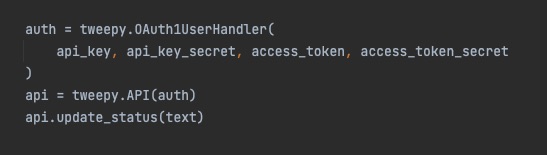
If you use the tweepy package, the bot itself will be pretty simple. For example, to tweet a new update from your account you can simply use this code:

api_key = "fetch_the_value_from_a_secure_place" api_key_secret = "fetch_the_value_from_a_secure_place" access_token = "fetch_the_value_from_a_secure_place" access_token_secret = "fetch_the_value_from_a_secure_place"

text = "A simple text!"

auth = tweepy.OAuth1UserHandler( api_key, api_key_secret, access_token, access_token_secret )

api = tweepy.API(auth) api.update_status(text)

Authentication

You can deep dive into the Twitter's official documentation here. Also, if you use Tweepy package, you can check here to see how you can authenticate using this library.

But, if you are as impatient as I am, and you only want to send a tweet to your own account, here is the list of things you should do:

Cry a bit! I'm joking, not yet at least...

You need an approved Twitter developer account. If you don’t have one, you should apply for access.

You should already have or create a new Twitter developer App. You can create a new one or access the existing ones in the Projects & Apps section of your developer portal.

To create a new tweet on your behalf, you should also apply for Elevated access. You should write a bit about why you need this access, how your project would function, and also share with Twitter what is your level of technical skills. You should also carefully read their terms and conditions to stay compliant. To be honest, for being able to just send a simple tweet, applying for such access seems a bit overkill to me, because with that you can send over 2M Tweets per month and have 3 different environments (production, staging, development).

If you do not apply for the Elevated access, you will get this error message when you attempt to send a tweet:

453 - You currently have Essential access which includes access to Twitter API v2 endpoints only. If you need access to this endpoint, you’ll need to apply for Elevated access via the Developer Portal.

You can learn more here: https://developer.twitter.com/en/docs/twitter-api/getting-started/about-twitter-api

You should use user context authentication using OAuth 1.0a

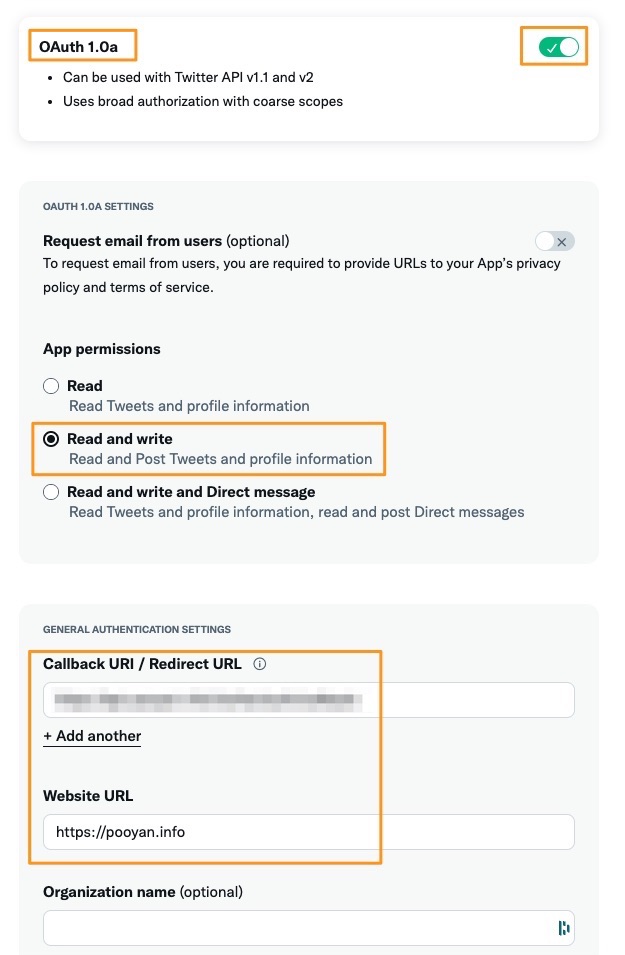
In the developer portal, select your application, then select the right environment, and then from the settings tab, below the "App details" section you should see another one called "User authentication settings". Click on that and turn on the read/write access for OAuth 1.0a.
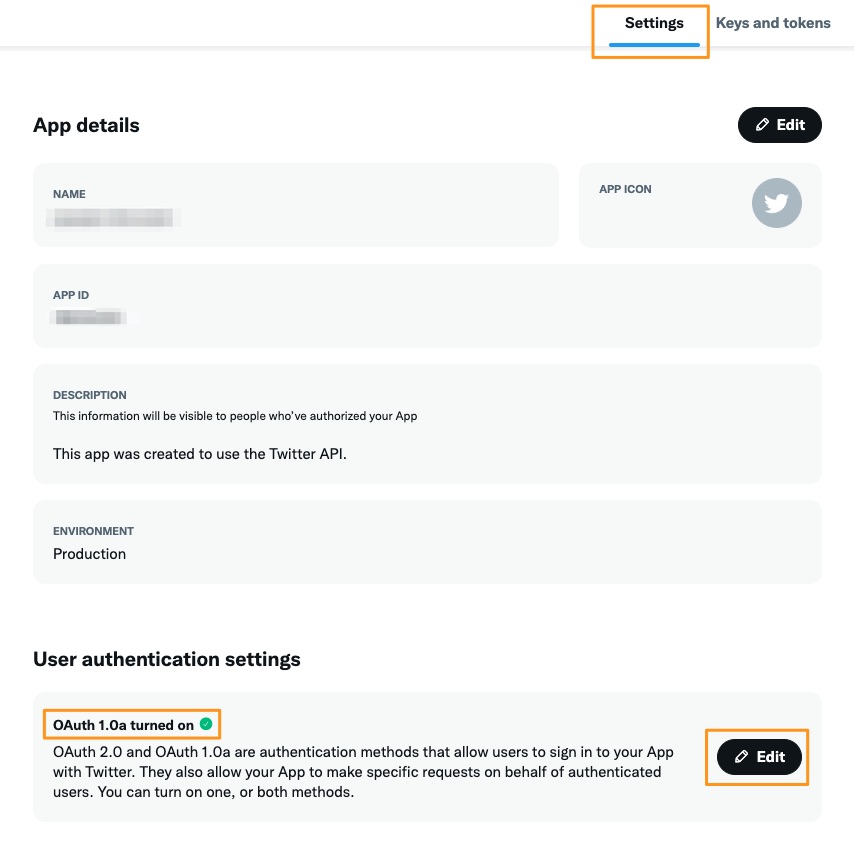
App settings

Auth setting details

Then click on the Keys and tokens tab, and generate two sets of pairs of keys and tokens, one pair for API Key and Secret and another one for Access Token and Secret. You should do this only after having given the read/write OAuth 1.0a access, otherwise you should wait a bit and generate them again. You can also regenerate these keys later from the same tab, if you want to periodically rotate them manually or if you have lost them.
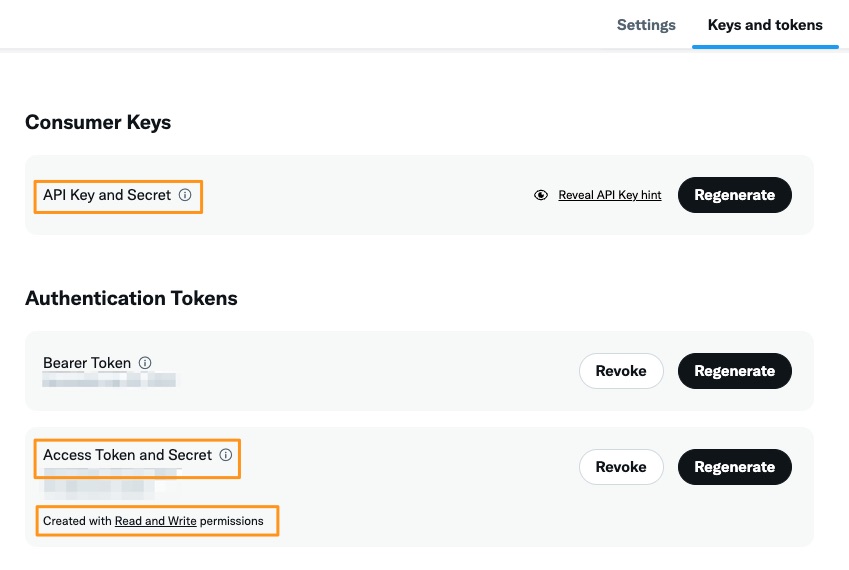
Auth setting details

Make sure you store these two pairs of keys and tokens in a very secure place, and DO NOT share them publicly, or add them to a git repository, or share them with anyone.

Congratulations! Now with these keys and tokens, you can send your first automated tweet to your own account.

For simpler scenarios, if only read-only access to public information is needed, you can generate and use a bearer token.

For more complicated scenarios, where your bot needs to impersonate other users and perform actions on their behalf, you should use "3-legged OAuth flow" for Oauth 1.0a or "Authorization Code Flow with PKCE" with OAuth 2.0. Also, in such scenarios, when you apply for the access, you should also fill more details about your bot and what will you do with the analyzed/gathered data.

Last but not least, again, make sure you carefully read Twitter's terms and condition!

If you liked the article, feel free to share it with your friends, family, or colleagues. You can also follow me on Medium or LinkedIn.

Copyright & Disclaimer

  • All content provided on this article is for informational and educational purposes only. The author makes no representations as to the accuracy or completeness of any information on this site or found by following any link on this site.
  • All the content is copyrighted, except the assets and content I have referenced to other people's work, and may not be reproduced on other websites, blogs, or social media. You are not allowed to reproduce, summarize to create derivative work, or use any content from this website under your name. This includes creating a similar article or summary based on AI/GenAI. For educational purposes, you may refer to parts of the content, and only refer, but you must provide a link back to the original article on this website. This is allowed only if your content is less than 10% similar to the original article.
  • While every care has been taken to ensure the accuracy of the content of this website, I make no representation as to the accuracy, correctness, or fitness for any purpose of the site content, nor do I accept any liability for loss or damage (including consequential loss or damage), however, caused, which may be incurred by any person or organization from reliance on or use of information on this site.
  • The contents of this article should not be construed as legal advice.
  • Opinions are my own and not the views of my employer.
  • English is not my mother-tongue language, so even though I try my best to express myself correctly, there might be a chance of miscommunication.
  • Links or references to other websites, including the use of information from 3rd-parties, are provided for the benefit of people who use this website. I am not responsible for the accuracy of the content on the websites that I have put a link to and I do not endorse any of those organizations or their contents.
  • If you have any queries or if you believe any information on this article is inaccurate, or if you think any of the assets used in this article are in violation of copyright, please contact me and let me know.

How to create a simple Twitter bot with Python

How to create a simple Twitter bot with Python
Published: July 30, 2022

Yesterday, I started building a bot to automatically tweet about the new articles I write on my website. In this article, I will share the simplest bot you can build and more importantly will share a few tips about how to deal with authentication/authorization especially if you want the bot to tweet on your behalf only, and if it is not supposed to impersonate other users. Please bear in mind, Twitter API is actively being updated, so this might change in the future.

I already had the experience of building a Twitter bot in NodeJs back in 2019 when I created @laravel_tweets bot in TypeScript and NodeJs. I remember, about a year after that, more precisely on August 12th, 2020, they officially introduced the Early Access release of Twitter API v2. Through these years they had gradually introduced these v1, v1.1, v2 different endpoints where each of them can only be used in certain scenarios, and to make it even more complicated, none of them supports all their supported ways of authentication and authorization, so it is your job to figure out what can be done with what.

Sample code

The bot itself

If you use the tweepy package, the bot itself will be pretty simple. For example, to tweet a new update from your account you can simply use this code:

api_key = "fetch_the_value_from_a_secure_place" api_key_secret = "fetch_the_value_from_a_secure_place" access_token = "fetch_the_value_from_a_secure_place" access_token_secret = "fetch_the_value_from_a_secure_place"

text = "A simple text!"

auth = tweepy.OAuth1UserHandler( api_key, api_key_secret, access_token, access_token_secret )

api = tweepy.API(auth) api.update_status(text)

Authentication

You can deep dive into the Twitter's official documentation here. Also, if you use Tweepy package, you can check here to see how you can authenticate using this library.

But, if you are as impatient as I am, and you only want to send a tweet to your own account, here is the list of things you should do:

Cry a bit! I'm joking, not yet at least...

You need an approved Twitter developer account. If you don’t have one, you should apply for access.

You should already have or create a new Twitter developer App. You can create a new one or access the existing ones in the Projects & Apps section of your developer portal.

To create a new tweet on your behalf, you should also apply for Elevated access. You should write a bit about why you need this access, how your project would function, and also share with Twitter what is your level of technical skills. You should also carefully read their terms and conditions to stay compliant. To be honest, for being able to just send a simple tweet, applying for such access seems a bit overkill to me, because with that you can send over 2M Tweets per month and have 3 different environments (production, staging, development).

If you do not apply for the Elevated access, you will get this error message when you attempt to send a tweet:

453 - You currently have Essential access which includes access to Twitter API v2 endpoints only. If you need access to this endpoint, you’ll need to apply for Elevated access via the Developer Portal.

You can learn more here: https://developer.twitter.com/en/docs/twitter-api/getting-started/about-twitter-api

You should use user context authentication using OAuth 1.0a

In the developer portal, select your application, then select the right environment, and then from the settings tab, below the "App details" section you should see another one called "User authentication settings". Click on that and turn on the read/write access for OAuth 1.0a.

App settings

Auth setting details

Then click on the Keys and tokens tab, and generate two sets of pairs of keys and tokens, one pair for API Key and Secret and another one for Access Token and Secret. You should do this only after having given the read/write OAuth 1.0a access, otherwise you should wait a bit and generate them again. You can also regenerate these keys later from the same tab, if you want to periodically rotate them manually or if you have lost them.

Auth setting details

Make sure you store these two pairs of keys and tokens in a very secure place, and DO NOT share them publicly, or add them to a git repository, or share them with anyone.

Congratulations! Now with these keys and tokens, you can send your first automated tweet to your own account.

For simpler scenarios, if only read-only access to public information is needed, you can generate and use a bearer token.

For more complicated scenarios, where your bot needs to impersonate other users and perform actions on their behalf, you should use "3-legged OAuth flow" for Oauth 1.0a or "Authorization Code Flow with PKCE" with OAuth 2.0. Also, in such scenarios, when you apply for the access, you should also fill more details about your bot and what will you do with the analyzed/gathered data.

Last but not least, again, make sure you carefully read Twitter's terms and condition!

If you liked the article, feel free to share it with your friends, family, or colleagues. You can also follow me on Medium or LinkedIn.

Copyright & Disclaimer

  • All content provided on this article is for informational and educational purposes only. The author makes no representations as to the accuracy or completeness of any information on this site or found by following any link on this site.
  • All the content is copyrighted, except the assets and content I have referenced to other people's work, and may not be reproduced on other websites, blogs, or social media. You are not allowed to reproduce, summarize to create derivative work, or use any content from this website under your name. This includes creating a similar article or summary based on AI/GenAI. For educational purposes, you may refer to parts of the content, and only refer, but you must provide a link back to the original article on this website. This is allowed only if your content is less than 10% similar to the original article.
  • While every care has been taken to ensure the accuracy of the content of this website, I make no representation as to the accuracy, correctness, or fitness for any purpose of the site content, nor do I accept any liability for loss or damage (including consequential loss or damage), however, caused, which may be incurred by any person or organization from reliance on or use of information on this site.
  • The contents of this article should not be construed as legal advice.
  • Opinions are my own and not the views of my employer.
  • English is not my mother-tongue language, so even though I try my best to express myself correctly, there might be a chance of miscommunication.
  • Links or references to other websites, including the use of information from 3rd-parties, are provided for the benefit of people who use this website. I am not responsible for the accuracy of the content on the websites that I have put a link to and I do not endorse any of those organizations or their contents.
  • If you have any queries or if you believe any information on this article is inaccurate, or if you think any of the assets used in this article are in violation of copyright, please contact me and let me know.
Copyright © 2025 - pooyan.info