Hire me
Pooyan Razian

Make dependency updates boring again

Make dependency updates boring again
Published: July 17, 2026

Dependency updates are one of those things teams keep postponing. Not because they do not care, but because every update feels like a risk. A small version bump can break a build, fail tests, or create unexpected issues in production.

That is why I built Update Dependencies, a GitHub Action that keeps dependencies up to date automatically and opens a pull request, gated on your checks passing when you give it any to run.

Get it on GitHub Marketplace · Source on GitHub

What it does

It scans every package manager in your repo, in one run, across every path in a monorepo, not just the root. Every change lands in a pull request that is labeled breaking or non-breaking based on the actual version jump, not just the mode you ran it in.

If you give it check-commands (tests, lint, build), a failing update never opens a pull request in the first place. Leave that empty and it will still open one, letting your repo's own pull request CI check the update the same way it checks everything else.

It also protects you from freshly published attacks

A version that was published an hour ago is not automatically safe just because the version number is higher. A good chunk of recent supply chain attacks worked by publishing a compromised release and letting update bots pick it up within minutes, before anyone noticed. Dependabot addressed this with a minimum release age setting, and Update Dependencies does the same thing.

min-release-age-days (default 3) waits out a version's first few days before updating to it. That gives the community a window to catch a bad release before it reaches you. If the newest version is too young, the Action walks back to the newest one that is old enough, skipping any candidate that turns out to itself be vulnerable.

The one exception: a version that fixes a disclosed vulnerability, checked against the OSV.dev database, always bypasses the wait. Getting a real security fix should never be held up by a policy meant to stop bad ones.

This check fails open on purpose. If a registry or OSV.dev lookup does not come back in time, the update still goes through, just marked "Unverified" in the pull request instead of blocking the whole run over one slow API. Every pull request gets a "Release-age policy" section explaining exactly why each package was held back, allowed early, or left unverified.

Supported package managers

EcosystemLanguageWhat it updates
npm, Yarn, pnpmJavaScript/TypeScriptpackage.json + lockfile
pipPythonrequirements.txt
CargoRustCargo.toml + Cargo.lock
GoGogo.mod + go.sum
MavenJava/JVMpom.xml
GradleJava/JVMversion catalog or build.gradle(.kts)
BundlerRubyGemfile + Gemfile.lock
ComposerPHPcomposer.json + composer.lock
NuGetC#/.NET*.csproj

Example workflow

Save this as .github/workflows/update-dependencies.yml. This is the recommended setup: no check-commands, a personal access token for github-token so your repo's own pull request CI runs on the update, and no trigger on pull_request (the FAQ in the repo explains why).

name: Update Dependencies

on:
  schedule:
    - cron: '0 2 * * 1' # every Monday at 02:00 UTC
  workflow_dispatch:

permissions:
  contents: write
  pull-requests: write

jobs:
  update:
    runs-on: ubuntu-latest
    steps:
      - uses: actions/checkout@v4

      - uses: yanovian/update-dependencies-action@v1
        with:
          update-strategy: non-breaking
          create-pull-request: true
          github-token: ${{ secrets.PAT_TOKEN }}

Main inputs

InputDefaultDescription
update-strategynon-breakingkeep every package within its current major version, or allow major jumps
check-commands(empty)commands to run after updating, one per line; all must exit 0 or no pull request opens
min-release-age-days3minimum days a version must have been published before updating to it; a fix for a known vulnerability always bypasses this
create-pull-requesttruewhether to open a pull request when updates are available and checks pass
base-branchrepo default branchbranch the pull request is opened against
branch-namechore/update-deps/<update-strategy>prefix for the branch; the actual branch is <branch-name>/<run-date>
config-path.github/update-dependencies.ymlpath to a config file to skip an ecosystem or a path; missing is fine
working-directory.directory to scan, relative to the repo root
github-token${{ github.token }}token used to push the branch and open the pull request; a PAT is recommended

What the pull request looks like

For every path in your repo where something changed, the description lists the package, the path, the version it moved from and to, and whether that change was breaking. It also lists every command that ran and passed, and explains why keeping dependencies current matters for security, while making clear that testing the change is still on you.
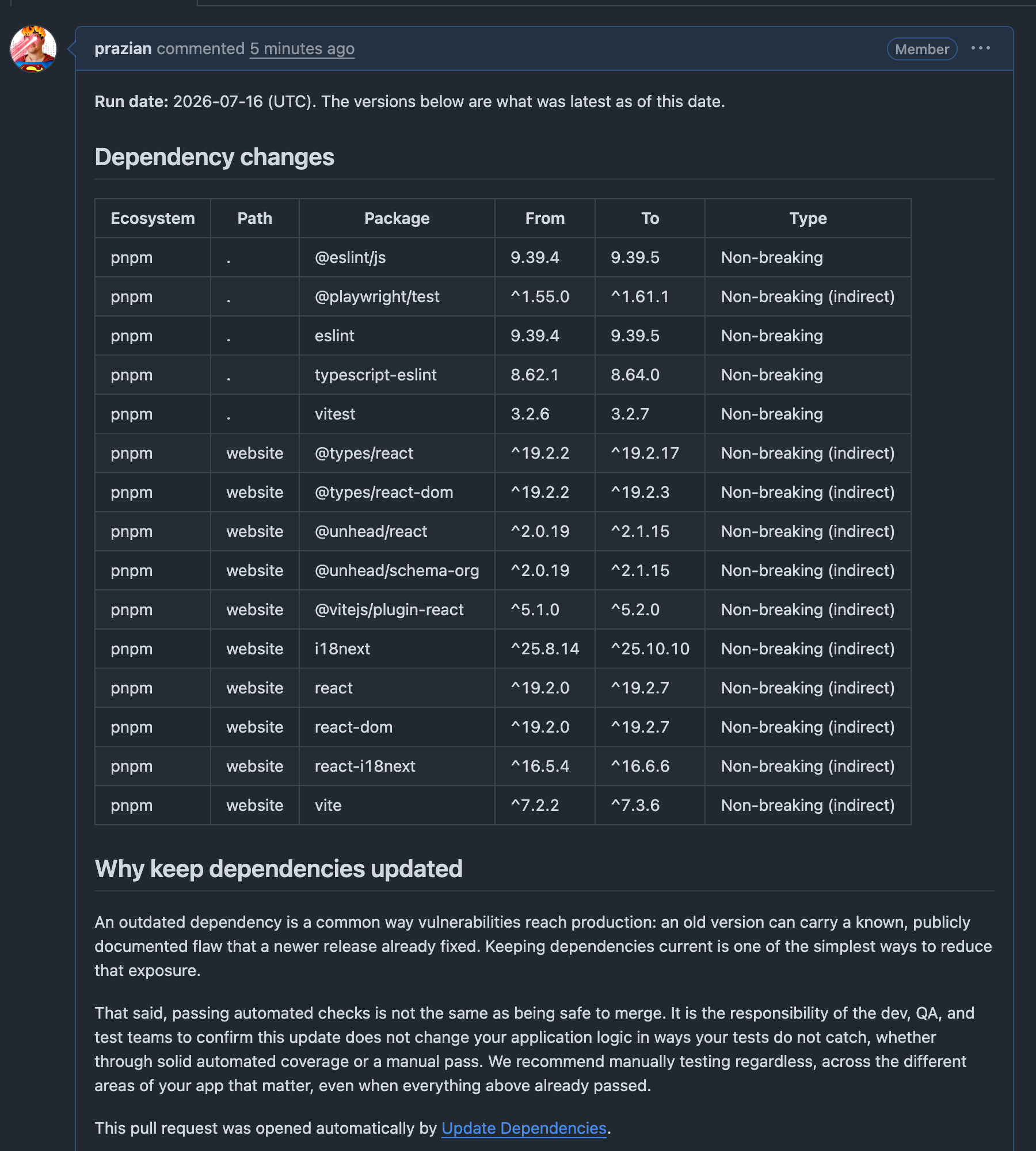
A pull request opened by Update Dependencies, showing the run date, a table of package version changes, and the security and testing-responsibility note
A pull request opened by Update Dependencies

Running it again the same day updates that same pull request instead of opening a new one. A run on a later date opens a new one, and if an earlier one from this Action is still open, the new pull request points to it and recommends closing it.

Permissions and tokens

Your workflow needs contents: write and pull-requests: write either way. For github-token, a PAT is recommended so your repo's own pull request CI runs on the update automatically; the default GITHUB_TOKEN also works, paired with check-commands.

If it can open a pull request only once your commands all pass, that is a real signal, but not a guarantee. Review the diff yourself before merging, especially for a breaking update.

The goal is simple: make dependency updates a regular habit instead of a stressful emergency task. Run it on a schedule, review the changes, and most of the time simply merge. Keep dependencies fresh, reduce security risks, and avoid months of accumulated updates.

Where it sits next to the bigger names

On the specific problem of updating a version without opening the door to a supply chain attack, this is doing what Dependabot does with its own minimum release age, plus a vulnerability check that decides when it is safe to skip the wait.

Update DependenciesDependabotRenovatePaid SCA tools (Snyk, Mend)
Minimum release age gateYes, configurableYesNoNo
Vulnerability-aware bypassYes (OSV.dev)NoNoYes (proprietary feeds)
CostFreeFreeFree self-hosted / paid hostedPaid
License and reachability scanningNoNoNoYes

It is not a replacement for a full paid SCA product, it does not do license scanning or reachability analysis. But for the one job it is built for, it is not missing the security feature that actually matters here.

For the license part specifically, pair it with Open License Auditor, another Action I built, which scans your dependency tree for risky and unidentified licenses on every pull request.

If you liked the article, feel free to share it with your friends, family, or colleagues. You can also follow me on Medium or LinkedIn.

Copyright & Disclaimer

  • All content provided on this article is for informational and educational purposes only. The author makes no representations as to the accuracy or completeness of any information on this site or found by following any link on this site.
  • All the content is copyrighted, except the assets and content I have referenced to other people's work, and may not be reproduced on other websites, blogs, or social media. You are not allowed to reproduce, summarize to create derivative work, or use any content from this website under your name. This includes creating a similar article or summary based on AI/GenAI. For educational purposes, you may refer to parts of the content, and only refer, but you must provide a link back to the original article on this website. This is allowed only if your content is less than 10% similar to the original article.
  • While every care has been taken to ensure the accuracy of the content of this website, I make no representation as to the accuracy, correctness, or fitness for any purpose of the site content, nor do I accept any liability for loss or damage (including consequential loss or damage), however, caused, which may be incurred by any person or organization from reliance on or use of information on this site.
  • The contents of this article should not be construed as legal advice.
  • Opinions are my own and not the views of my employer.
  • English is not my mother-tongue language, so even though I try my best to express myself correctly, there might be a chance of miscommunication.
  • Links or references to other websites, including the use of information from 3rd-parties, are provided for the benefit of people who use this website. I am not responsible for the accuracy of the content on the websites that I have put a link to and I do not endorse any of those organizations or their contents.
  • If you have any queries or if you believe any information on this article is inaccurate, or if you think any of the assets used in this article are in violation of copyright, please contact me and let me know.

Make dependency updates boring again

Make dependency updates boring again
Published: July 17, 2026

Dependency updates are one of those things teams keep postponing. Not because they do not care, but because every update feels like a risk. A small version bump can break a build, fail tests, or create unexpected issues in production.

That is why I built Update Dependencies, a GitHub Action that keeps dependencies up to date automatically and opens a pull request, gated on your checks passing when you give it any to run.

Get it on GitHub Marketplace · Source on GitHub

What it does

It scans every package manager in your repo, in one run, across every path in a monorepo, not just the root. Every change lands in a pull request that is labeled breaking or non-breaking based on the actual version jump, not just the mode you ran it in.

If you give it check-commands (tests, lint, build), a failing update never opens a pull request in the first place. Leave that empty and it will still open one, letting your repo's own pull request CI check the update the same way it checks everything else.

It also protects you from freshly published attacks

A version that was published an hour ago is not automatically safe just because the version number is higher. A good chunk of recent supply chain attacks worked by publishing a compromised release and letting update bots pick it up within minutes, before anyone noticed. Dependabot addressed this with a minimum release age setting, and Update Dependencies does the same thing.

min-release-age-days (default 3) waits out a version's first few days before updating to it. That gives the community a window to catch a bad release before it reaches you. If the newest version is too young, the Action walks back to the newest one that is old enough, skipping any candidate that turns out to itself be vulnerable.

The one exception: a version that fixes a disclosed vulnerability, checked against the OSV.dev database, always bypasses the wait. Getting a real security fix should never be held up by a policy meant to stop bad ones.

This check fails open on purpose. If a registry or OSV.dev lookup does not come back in time, the update still goes through, just marked "Unverified" in the pull request instead of blocking the whole run over one slow API. Every pull request gets a "Release-age policy" section explaining exactly why each package was held back, allowed early, or left unverified.

Supported package managers

EcosystemLanguageWhat it updates
npm, Yarn, pnpmJavaScript/TypeScriptpackage.json + lockfile
pipPythonrequirements.txt
CargoRustCargo.toml + Cargo.lock
GoGogo.mod + go.sum
MavenJava/JVMpom.xml
GradleJava/JVMversion catalog or build.gradle(.kts)
BundlerRubyGemfile + Gemfile.lock
ComposerPHPcomposer.json + composer.lock
NuGetC#/.NET*.csproj

Example workflow

Save this as .github/workflows/update-dependencies.yml. This is the recommended setup: no check-commands, a personal access token for github-token so your repo's own pull request CI runs on the update, and no trigger on pull_request (the FAQ in the repo explains why).

name: Update Dependencies

on:
  schedule:
    - cron: '0 2 * * 1' # every Monday at 02:00 UTC
  workflow_dispatch:

permissions:
  contents: write
  pull-requests: write

jobs:
  update:
    runs-on: ubuntu-latest
    steps:
      - uses: actions/checkout@v4

      - uses: yanovian/update-dependencies-action@v1
        with:
          update-strategy: non-breaking
          create-pull-request: true
          github-token: ${{ secrets.PAT_TOKEN }}

Main inputs

InputDefaultDescription
update-strategynon-breakingkeep every package within its current major version, or allow major jumps
check-commands(empty)commands to run after updating, one per line; all must exit 0 or no pull request opens
min-release-age-days3minimum days a version must have been published before updating to it; a fix for a known vulnerability always bypasses this
create-pull-requesttruewhether to open a pull request when updates are available and checks pass
base-branchrepo default branchbranch the pull request is opened against
branch-namechore/update-deps/<update-strategy>prefix for the branch; the actual branch is <branch-name>/<run-date>
config-path.github/update-dependencies.ymlpath to a config file to skip an ecosystem or a path; missing is fine
working-directory.directory to scan, relative to the repo root
github-token${{ github.token }}token used to push the branch and open the pull request; a PAT is recommended

What the pull request looks like

For every path in your repo where something changed, the description lists the package, the path, the version it moved from and to, and whether that change was breaking. It also lists every command that ran and passed, and explains why keeping dependencies current matters for security, while making clear that testing the change is still on you.

A pull request opened by Update Dependencies, showing the run date, a table of package version changes, and the security and testing-responsibility note
A pull request opened by Update Dependencies

Running it again the same day updates that same pull request instead of opening a new one. A run on a later date opens a new one, and if an earlier one from this Action is still open, the new pull request points to it and recommends closing it.

Permissions and tokens

Your workflow needs contents: write and pull-requests: write either way. For github-token, a PAT is recommended so your repo's own pull request CI runs on the update automatically; the default GITHUB_TOKEN also works, paired with check-commands.

If it can open a pull request only once your commands all pass, that is a real signal, but not a guarantee. Review the diff yourself before merging, especially for a breaking update.

The goal is simple: make dependency updates a regular habit instead of a stressful emergency task. Run it on a schedule, review the changes, and most of the time simply merge. Keep dependencies fresh, reduce security risks, and avoid months of accumulated updates.

Where it sits next to the bigger names

On the specific problem of updating a version without opening the door to a supply chain attack, this is doing what Dependabot does with its own minimum release age, plus a vulnerability check that decides when it is safe to skip the wait.

Update DependenciesDependabotRenovatePaid SCA tools (Snyk, Mend)
Minimum release age gateYes, configurableYesNoNo
Vulnerability-aware bypassYes (OSV.dev)NoNoYes (proprietary feeds)
CostFreeFreeFree self-hosted / paid hostedPaid
License and reachability scanningNoNoNoYes

It is not a replacement for a full paid SCA product, it does not do license scanning or reachability analysis. But for the one job it is built for, it is not missing the security feature that actually matters here.

For the license part specifically, pair it with Open License Auditor, another Action I built, which scans your dependency tree for risky and unidentified licenses on every pull request.

If you liked the article, feel free to share it with your friends, family, or colleagues. You can also follow me on Medium or LinkedIn.

Copyright & Disclaimer

  • All content provided on this article is for informational and educational purposes only. The author makes no representations as to the accuracy or completeness of any information on this site or found by following any link on this site.
  • All the content is copyrighted, except the assets and content I have referenced to other people's work, and may not be reproduced on other websites, blogs, or social media. You are not allowed to reproduce, summarize to create derivative work, or use any content from this website under your name. This includes creating a similar article or summary based on AI/GenAI. For educational purposes, you may refer to parts of the content, and only refer, but you must provide a link back to the original article on this website. This is allowed only if your content is less than 10% similar to the original article.
  • While every care has been taken to ensure the accuracy of the content of this website, I make no representation as to the accuracy, correctness, or fitness for any purpose of the site content, nor do I accept any liability for loss or damage (including consequential loss or damage), however, caused, which may be incurred by any person or organization from reliance on or use of information on this site.
  • The contents of this article should not be construed as legal advice.
  • Opinions are my own and not the views of my employer.
  • English is not my mother-tongue language, so even though I try my best to express myself correctly, there might be a chance of miscommunication.
  • Links or references to other websites, including the use of information from 3rd-parties, are provided for the benefit of people who use this website. I am not responsible for the accuracy of the content on the websites that I have put a link to and I do not endorse any of those organizations or their contents.
  • If you have any queries or if you believe any information on this article is inaccurate, or if you think any of the assets used in this article are in violation of copyright, please contact me and let me know.
Copyright © 2026 - pooyan.info