Pooyan Razian

Subject-based twitter bots who can exclude spammers! How?

Subject-based twitter bots who can exclude spammers! How?
Published: August 7, 2022

Following technical topics on Twitter is not always easy. Why?

Because:

It is not possible to follow everyone who tweets about the topic you are interested in.

Even if you do so, they not always tweet about the topics you are interested in.

You can continuously use Twitter's search option, but even their results are full of unrelated content.

Most interesting hashtags are polluted with marketing material, AKA spam!

As an example, if you search for Python as a programming language, you will get a mix of technical content and news about giant snakes around the world!

Tweets are in different languages, and you cannot easily filter out the non-English ones.

If you search for a technical topic, you don't want to get pornography or other unrelated material, but this can happen because there might be a similarity between the words you have searched for and a username on Twitter or the word might have been used in the middle of a link that someone has shared.

How to tackle the problem?

In this article I had already explained how to build a simple Twitter bot with Python and especially how to deal with authentication. The subject-based Twitter bots that I have built are also written in Python and have go through the same process for getting approvals, tokens, etc. I am also running them on AWS Lambda functions that are triggered by AWS EventBridge every six minutes.

Even though the logic would change in the future, but for now I check these conditions:

I use Amazon Comprehend to check if the content of the Tweet, and the description in the user profile are in English. If you want to use this service, don't forget that your application needs proper permissions to access it. You can either use an AWS managed policy like ComprehendReadOnly or create your fine-grained one. If you decide to use this service, make sure you check the pricing in advance and keep an eye on your AWS costs.

I use Amazon Rekognition to assure the user who has tweeted is not using nudity, violence, or hate simbols in their profile photo or the background image they have used. If you want to use this service, don't forget that your application needs proper permissions to access it. You can either use an AWS managed policy like AmazonRekognitionReadOnlyAccess or create your fine-grained one. If you decide to use this service, make sure you check the pricing in advance and keep an eye on your AWS costs, because Rekognition is one of the most expensive services that Amazon provides.

I check if the tweet itself contains any of the words related to the topic.

I check the content of the tweet to assure it doesn't contain unrelated or unwanted words.

I check user's name and description to assure they don't contain unwanted words.

I check if the tweet is a quote to another one. If so, I check the content of the quoted tweet to assure it doesn't contain unwanted words.

I check if the user who has tweeted is not too new or too unpopular. That's usually a sign of spam.

I check if the user tries to abuse the bot, for example by tweeting too much.

I check if the tweet contains too many hashtags. That's usually a sign of abusing hashtags.

I check if the tweet contains too many new-lines. That's usually a sign of spam.

These checks are not covering all the possibilities and will probably be improved in the future. I also might use the power of natural language processing by training a custom model and labeling based on some known articles.

List of the bots

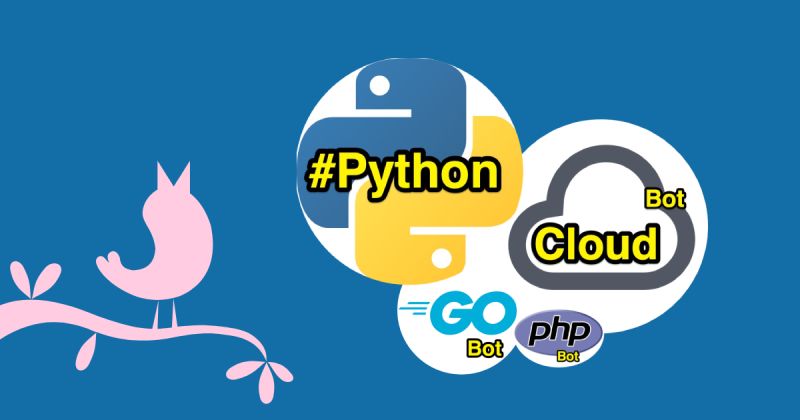
Cloud Smart Bot

Retweets contents related to Cloud infrastructure, AWS, GCP, Azure, Cloudflare, Kubernetes, Docker, etc.

Python Smart Bot

Retweets contents related to Python programming language.

GoLang Smart Bot

Retweets contents related to Golang programming language.

PHP Smart Bot

Retweets contents related to PHP, Laravel, Symfony, etc.

Final notes

Even though these bots are not perfect yet, but they could manage to exclude about 95% - 98% of spam, unwanted and unrelated content.
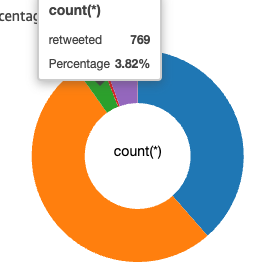
Percentage of related content vs spam

If you like the idea, don't forget to follow any of the bots from the list above. Also, if you want to be notified of my future articles, don't forget to follow me either on Twitter at @pooyan_razian. or on Medium at @pooyan_razian.

Cheers! 🍻

If you liked the article, feel free to share it with your friends, family, or colleagues. You can also follow me on Medium or LinkedIn.

Copyright & Disclaimer

  • All content provided on this article is for informational and educational purposes only. The author makes no representations as to the accuracy or completeness of any information on this site or found by following any link on this site.
  • All the content is copyrighted, except the assets and content I have referenced to other people's work, and may not be reproduced on other websites, blogs, or social media. You are not allowed to reproduce, summarize to create derivative work, or use any content from this website under your name. This includes creating a similar article or summary based on AI/GenAI. For educational purposes, you may refer to parts of the content, and only refer, but you must provide a link back to the original article on this website. This is allowed only if your content is less than 10% similar to the original article.
  • While every care has been taken to ensure the accuracy of the content of this website, I make no representation as to the accuracy, correctness, or fitness for any purpose of the site content, nor do I accept any liability for loss or damage (including consequential loss or damage), however, caused, which may be incurred by any person or organization from reliance on or use of information on this site.
  • The contents of this article should not be construed as legal advice.
  • Opinions are my own and not the views of my employer.
  • English is not my mother-tongue language, so even though I try my best to express myself correctly, there might be a chance of miscommunication.
  • Links or references to other websites, including the use of information from 3rd-parties, are provided for the benefit of people who use this website. I am not responsible for the accuracy of the content on the websites that I have put a link to and I do not endorse any of those organizations or their contents.
  • If you have any queries or if you believe any information on this article is inaccurate, or if you think any of the assets used in this article are in violation of copyright, please contact me and let me know.

Subject-based twitter bots who can exclude spammers! How?

Subject-based twitter bots who can exclude spammers! How?
Published: August 7, 2022

Following technical topics on Twitter is not always easy. Why?

Because:

It is not possible to follow everyone who tweets about the topic you are interested in.

Even if you do so, they not always tweet about the topics you are interested in.

You can continuously use Twitter's search option, but even their results are full of unrelated content.

Most interesting hashtags are polluted with marketing material, AKA spam!

As an example, if you search for Python as a programming language, you will get a mix of technical content and news about giant snakes around the world!

Tweets are in different languages, and you cannot easily filter out the non-English ones.

If you search for a technical topic, you don't want to get pornography or other unrelated material, but this can happen because there might be a similarity between the words you have searched for and a username on Twitter or the word might have been used in the middle of a link that someone has shared.

How to tackle the problem?

In this article I had already explained how to build a simple Twitter bot with Python and especially how to deal with authentication. The subject-based Twitter bots that I have built are also written in Python and have go through the same process for getting approvals, tokens, etc. I am also running them on AWS Lambda functions that are triggered by AWS EventBridge every six minutes.

Even though the logic would change in the future, but for now I check these conditions:

I use Amazon Comprehend to check if the content of the Tweet, and the description in the user profile are in English. If you want to use this service, don't forget that your application needs proper permissions to access it. You can either use an AWS managed policy like ComprehendReadOnly or create your fine-grained one. If you decide to use this service, make sure you check the pricing in advance and keep an eye on your AWS costs.

I use Amazon Rekognition to assure the user who has tweeted is not using nudity, violence, or hate simbols in their profile photo or the background image they have used. If you want to use this service, don't forget that your application needs proper permissions to access it. You can either use an AWS managed policy like AmazonRekognitionReadOnlyAccess or create your fine-grained one. If you decide to use this service, make sure you check the pricing in advance and keep an eye on your AWS costs, because Rekognition is one of the most expensive services that Amazon provides.

I check if the tweet itself contains any of the words related to the topic.

I check the content of the tweet to assure it doesn't contain unrelated or unwanted words.

I check user's name and description to assure they don't contain unwanted words.

I check if the tweet is a quote to another one. If so, I check the content of the quoted tweet to assure it doesn't contain unwanted words.

I check if the user who has tweeted is not too new or too unpopular. That's usually a sign of spam.

I check if the user tries to abuse the bot, for example by tweeting too much.

I check if the tweet contains too many hashtags. That's usually a sign of abusing hashtags.

I check if the tweet contains too many new-lines. That's usually a sign of spam.

These checks are not covering all the possibilities and will probably be improved in the future. I also might use the power of natural language processing by training a custom model and labeling based on some known articles.

List of the bots

Cloud Smart Bot

Retweets contents related to Cloud infrastructure, AWS, GCP, Azure, Cloudflare, Kubernetes, Docker, etc.

Python Smart Bot

Retweets contents related to Python programming language.

GoLang Smart Bot

Retweets contents related to Golang programming language.

PHP Smart Bot

Retweets contents related to PHP, Laravel, Symfony, etc.

Final notes

Even though these bots are not perfect yet, but they could manage to exclude about 95% - 98% of spam, unwanted and unrelated content.

Percentage of related content vs spam

If you like the idea, don't forget to follow any of the bots from the list above. Also, if you want to be notified of my future articles, don't forget to follow me either on Twitter at @pooyan_razian. or on Medium at @pooyan_razian.

Cheers! 🍻

If you liked the article, feel free to share it with your friends, family, or colleagues. You can also follow me on Medium or LinkedIn.

Copyright & Disclaimer

  • All content provided on this article is for informational and educational purposes only. The author makes no representations as to the accuracy or completeness of any information on this site or found by following any link on this site.
  • All the content is copyrighted, except the assets and content I have referenced to other people's work, and may not be reproduced on other websites, blogs, or social media. You are not allowed to reproduce, summarize to create derivative work, or use any content from this website under your name. This includes creating a similar article or summary based on AI/GenAI. For educational purposes, you may refer to parts of the content, and only refer, but you must provide a link back to the original article on this website. This is allowed only if your content is less than 10% similar to the original article.
  • While every care has been taken to ensure the accuracy of the content of this website, I make no representation as to the accuracy, correctness, or fitness for any purpose of the site content, nor do I accept any liability for loss or damage (including consequential loss or damage), however, caused, which may be incurred by any person or organization from reliance on or use of information on this site.
  • The contents of this article should not be construed as legal advice.
  • Opinions are my own and not the views of my employer.
  • English is not my mother-tongue language, so even though I try my best to express myself correctly, there might be a chance of miscommunication.
  • Links or references to other websites, including the use of information from 3rd-parties, are provided for the benefit of people who use this website. I am not responsible for the accuracy of the content on the websites that I have put a link to and I do not endorse any of those organizations or their contents.
  • If you have any queries or if you believe any information on this article is inaccurate, or if you think any of the assets used in this article are in violation of copyright, please contact me and let me know.
Copyright © 2025 - pooyan.info